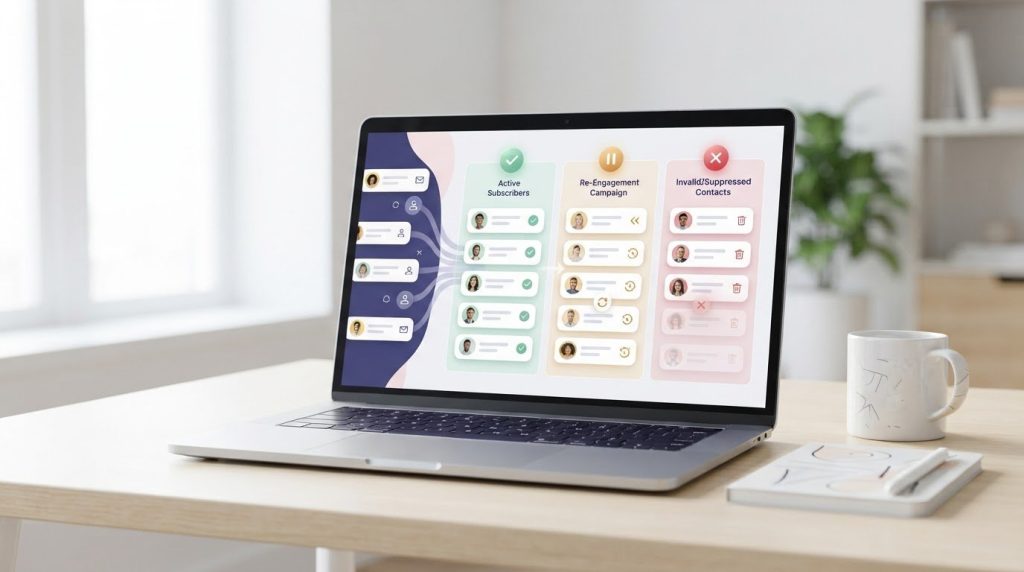

Re-engage genuinely inactive subscribers before removing them, but suppress invalid, hard-bouncing, or unsubscribed addresses without waiting for a campaign. A practical way to clean your email list to improve deliverability is to separate those risky addresses from people who may simply need a relevant reason to return; a 90-120-day inactivity window can help identify a segment for re-engagement.
It’s understandable to hesitate before removing contacts, especially after working hard to build your list. The key is to separate subscribers who may still want your emails from addresses that create deliverability or compliance risks. This matters even more when you move platforms or add new contacts: changing software doesn’t make an address valid or give you permission to email it.
This guide explains how to identify invalid, duplicate, disposable, and inactive addresses; when a re-engagement message makes sense; and what to suppress or retain in your records. You’ll also learn how to handle a list migration or newly collected contacts carefully, so cleanup supports inbox placement and responsible email practices.
Key Takeaways
- Keep unsubscribe requests suppressed and retain records that show how subscribers joined and when their preferences changed.
- Separate invalid, duplicate, disposable, and inactive addresses so each group gets the right next step.
- Try a focused re-engagement campaign for inactive subscribers who may still want your emails, then suppress those who remain unresponsive.
- Remove hard-bouncing addresses promptly, and monitor soft bounces before deciding whether to suppress them.
- When moving platforms or adding contacts, preserve permission records, use double opt-in for new sign-ups, and avoid purchased lists.
1. Compliance records and unsubscribe suppression
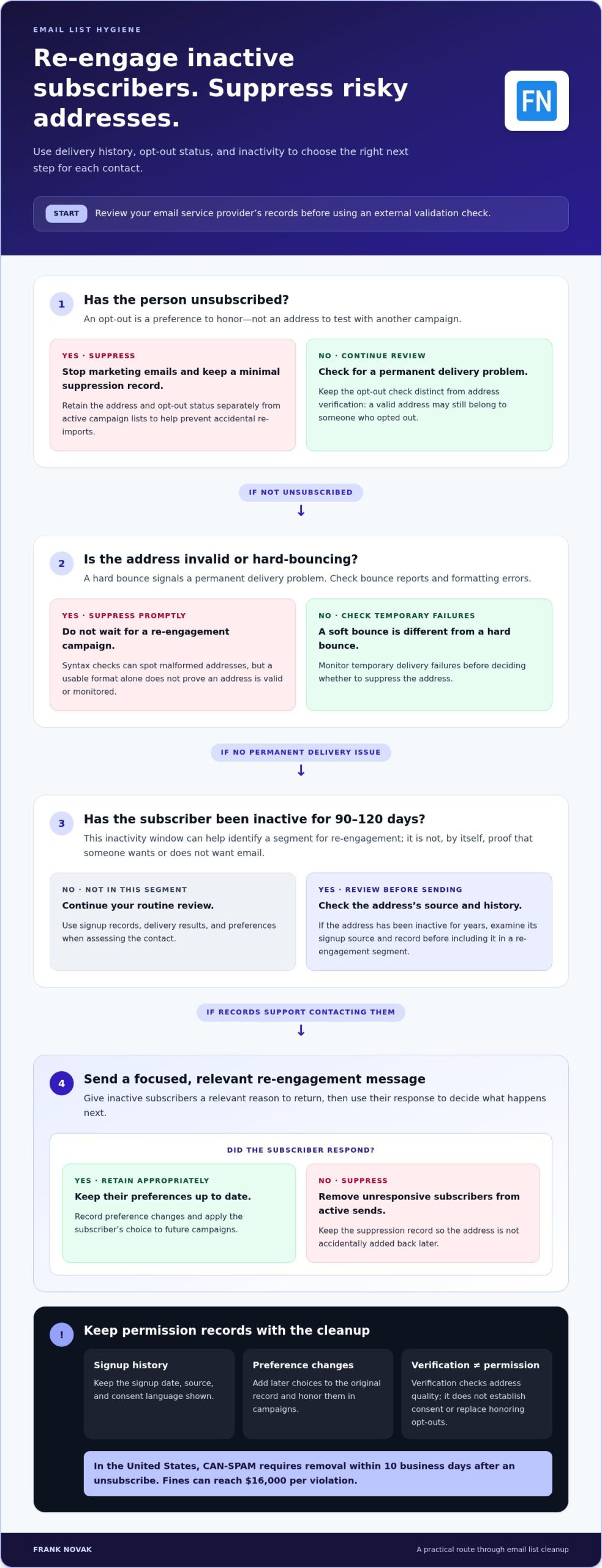
Start with the unsubscribe process, not the deletion button. In the United States, CAN-SPAM requires businesses to remove a person from an email list within 10 business days after that person unsubscribes. CAN-SPAM fines can reach $16,000 per violation. Record each request’s date, source, and processing status so your team can show what happened. For example, if someone unsubscribes through a campaign footer, keep that request tied to the address and suppress it from future marketing sends.
Email verification can support list hygiene, but it doesn’t establish compliance with CAN-SPAM by itself. Verification checks address quality; it doesn’t replace the requirement to honor unsubscribe requests within 10 business days. Treat verification as one operational check, not proof that a contact wants messages. A valid address may belong to someone who opted out, while a misspelled address may still appear in an old record.
Keep a clear record of each signup and any later preference changes. Store the date, form or source, and consent language shown when the person subscribed. If a contact changes preferences, add that update to the original record. This history helps distinguish a genuine subscriber from an imported address with no clear origin. It also gives your team a practical reference if a customer asks why they received a message.
Make unsubscribing easy to find and complete. A clear link in the email footer is more useful than a process that requires a login or several screens. Where appropriate, offer an opt-down, such as fewer emails or product updates only, while keeping the full unsubscribe option visible. Save a reader’s choice and apply it to the next campaign; choosing fewer messages isn’t permission to send every type of email.
Unsubscribing and deleting a contact are different actions. Unsubscribing stops marketing emails; deleting removes the record from a system. If you erase every trace of an opt-out, a later import could add that address again. Keep a minimal suppression record, such as the email address and opt-out status, separate from active campaign lists. Limit access to it and use it to prevent accidental re-imports.
Automate suppression if your email platform reliably processes footer requests, then test the workflow with a controlled address. Confirm that the request updates the suppression list and blocks the next campaign. For requests received by phone or direct reply, assign a team member to enter the address manually. Record the date and completion status, then check the suppression list before sending.
A spam trap can signal careless list practices, so don’t treat verification as a reason to email every address it accepts. Review how each contact joined, preserve unsubscribe records, and suppress addresses promptly. Manually enter requests that arrive outside the platform to close gaps automation may miss. These steps make list hygiene repeatable and create records that help you monitor your process.
2. Identifying invalid, duplicate, disposable, and inactive addresses
Start with your email service provider’s records before using an external validation check. Review recent bounce reports, promptly remove hard-bouncing addresses, and separate temporary delivery failures for monitoring. Then check for formatting errors, duplicate entries, and addresses with no clear signup source. This staged review helps distinguish a fixable typo from an address that should not receive another campaign.
Syntax validation catches malformed addresses such as “john@.com” or “mary@gmail.” It checks whether an address follows a usable format, not whether someone owns or monitors it. Use syntax as an initial filter, then compare results with delivery history. An address can pass a formatting check and still be invalid, disposable, inactive, or associated with a spam trap. This is one practical step in how to clean your email list to improve deliverability.
Double opt-in sends a confirmation email to a new subscriber, who must confirm the address and their interest before becoming an active contact. Signup-form validation can catch obvious typing mistakes as they happen. Together, these steps reduce errors and help confirm that an address is monitored, but they don’t prove future engagement.
To remove duplicates, normalize the data before matching records. Trim accidental spaces and compare addresses without changing meaningful characters. If an address appears several times, keep one active record and preserve its signup source and preference history. For example, don’t let an older imported entry overwrite a newer record showing an unsubscribe or opt-down preference.
Group poor-quality addresses by likely cause: invalid formatting, hard bounces, disposable inboxes, role-based accounts, duplicates, and suspected spam traps. A hard bounce signals a permanent delivery problem, so remove that address when it bounces. Review disposable or role-based addresses against your collection rules and campaign purpose. An address isn’t safe simply because it appears in a database.
Before using an external validation tool, use your email service provider to identify likely inactive addresses. Send only that segment for review, rather than exposing your entire contact file. Check each bounce reason, since a temporary issue differs from an invalid address. If an address has been inactive for years, examine its source and history before deciding whether to include it in a re-engagement segment.
An address captured 10 years ago may no longer be useful. Compare recent engagement, delivery results, and signup records before suppressing a quiet subscriber. Track the bounce rate after each cleanup to evaluate your rules. If you’re deciding how to clean your email list to improve deliverability, use these checks to separate correctable data issues from contacts that should no longer receive messages. Explore online marketing guidance alongside these list-management steps.
3. Re-engaging inactive subscribers
Before removing quiet contacts, separate inactivity from invalidity. A subscriber who hasn’t clicked recently may still want useful updates, while a hard-bouncing address needs a different action. A 90-120-day window can help identify contacts for a re-engagement campaign. Use activity such as opens, clicks, and purchases to make the segment more relevant. Keep actively engaged subscribers out of the campaign, even if they haven’t opened a particular message.
You can clean an email list without losing engaged subscribers by segmenting contacts according to recent behavior, then sending a focused campaign to the inactive group. For example, exclude recent clickers and customers who purchased, even if they haven’t opened emails. This keeps the re-engagement message away from contacts whose actions already show interest.
Build the campaign around a clear choice. Ask subscribers who haven’t opened an email in 90 days to confirm whether they still want messages. You can also ask what changed or offer a relevant deal on their next purchase. Keep the request direct, explain what kind of emails they’ll receive, and make the opt-in action easy to complete.
After sending the re-engagement message, wait 7-14 days for responses. During that window, track clicks, replies, and preference updates, not just opens. A subscriber who confirms interest or updates email preferences can remain active under the selected terms. If someone unsubscribes, suppress the address; if there’s no response, move the contact toward your sunset process.
Set an inactivity threshold that fits your sending rhythm and audience. A 6-12-month period is a typical range for an email sunset policy. A seasonal business may define inactivity differently from a brand that emails weekly. For example, account for a subscriber who engages during an annual buying season, rather than labeling them inactive during the quiet months.
Apply the threshold consistently. One business’s example defines an inactive contact as someone who received 10 emails in the last 12 months and didn’t open or click those emails during that period. Treat that as an example, not a universal rule. Before suppressing the segment, review campaign history and seasonal patterns. Then stop sending to contacts who remain unresponsive after the re-engagement period, reducing unnecessary sends while preserving subscribers who actively choose to stay.
4. Hard-bounce, soft-bounce, and complaint suppression
A hard bounce points to a permanent delivery problem, such as an invalid address. Remove hard-bouncing addresses as soon as they bounce, and retain the bounce reason in your records. A soft bounce usually reflects a temporary issue, such as a full inbox. Don’t treat one temporary failure like a permanent address problem. Track soft bounces across 3-5 sends before deciding whether to suppress the address.
Use a separate review segment for soft bounces. Flag an address after 3 or more consecutive bounces, then pause sending for a few weeks before trying again. If the address continues to fail, suppress it rather than repeatedly sending. An email service provider may remove bounced addresses automatically, but review its suppression reports to confirm that hard bounces don’t remain in active campaign segments.
Check the bounce rate after each campaign, not only during scheduled list cleaning. A bounce rate creeping above 2% is a signal to clean the list, while a healthy email program typically has a bounce rate below 1%. Clean lists maintain bounce rates under 2%; dirty lists average 5-10%. Compare like-for-like campaigns and segments so a change in audience doesn’t hide a worsening pattern.
Spam complaints need their own suppression rule. Remove a complainer from marketing sends and keep the suppression status available to prevent re-importing the address. A clean email list averages a 0.05% complaint rate, while dirty lists often exceed 0.3%. Monthly cleaning is recommended when spam complaints exceed 0.1%. Gmail and Yahoo set a 2% threshold for email-list warning signs, and a 0.3% complaint threshold can precede junk filtering.
Sender reputation depends partly on how recipients and mailbox providers respond to messages. Watch bounce trends, complaints, and engagement together; a sudden rise in bounces after importing a segment deserves review before another send. A sender reputation score below 80 is a warning sign that the list may need attention. Use that signal to inspect recent sources, suppression rules, and campaign targeting rather than repeatedly mailing the same addresses.
After an engagement campaign, keep responders in the appropriate active segment and suppress people who unsubscribe or complain. Don’t use opens alone to overrule a bounce or complaint; those delivery signals call for separate handling. If bounces rise above 2%, pause the affected segment, inspect the reasons, and remove permanent failures. This gives your next campaign a cleaner audience and makes sender reputation monitoring more actionable.
Build a simple review routine around each send: record hard bounces, count consecutive soft bounces, and log complaints. Apply the same rules to new and older segments, including contacts imported during a platform change. If your provider’s automatic suppression and your own records differ, reconcile them before the next campaign. Consistent monitoring helps identify whether list quality, audience selection, or a temporary delivery issue needs attention.
5. List cleaning when switching email platforms or acquiring contacts
A platform migration moves records, not permission to email them. Before importing contacts, map each source field, including signup date, permission status, unsubscribe history, and bounce records. Keep suppressed addresses out of active campaign segments, then compare the new platform’s suppression file with your original records. For example, a contact marked unsubscribed in the old system must not become active because the new platform uses a blank preference field.
Clean the export before uploading it. Remove duplicate rows, invalid addresses, hard bounces, and contacts whose origin you can’t establish. Keep active subscribers separate from suppressed contacts, and preserve the reason for each suppression. Then check a sample in the new platform: confirm that consent details remain attached and that an unsubscribed test record cannot receive a campaign.
Don’t use a platform change as a reason to email every historical contact. If a segment hasn’t received email for a long time, review its signup source and engagement before sending. Use a re-engagement campaign for contacts with a clear permission history but limited recent activity. Suppress people who opted out, complained, or repeatedly bounced, rather than testing them with a migration announcement.
New contacts require the same attention to source and permission. A purchased list may contain spam traps and other problematic addresses, so businesses should not buy email lists. Unverified contacts can also lead to bounces and spam complaints, particularly when recipients don’t recognize the sender. Email verification can help identify address problems, but it doesn’t establish that someone agreed to receive your marketing.
For new sign-ups, use double opt-in to confirm interest and check that the address is valid and monitored. The confirmation message creates a clear step between form submission and regular email marketing. Keep the resulting signup record with the contact, including its source and preference status. If the person doesn’t confirm, don’t add that address to the active sending segment.
After importing approved contacts, send deliberately and monitor the initial results. Start with the segment that has the clearest signup history and recent engagement, then review bounces, spam complaints, and unsubscribes before expanding. If the metrics worsen, pause the affected segment and identify and remove problematic records. This gradual approach makes list hygiene part of the migration, not a cleanup task after delivery problems appear.
For a practical framework for building and managing an online business, explore email marketing strategies.
Frank Novak: Online Success Coaching
Online Success Coaching can help you connect email list practices with a broader digital business strategy. After cleaning your contacts, you may want to plan how email fits alongside traffic generation, affiliate marketing, and business automation. Coaching provides a place to work through those decisions and develop a practical next-step plan for your online business.
If your focus is affiliate marketing, the ClickBank Super Funnel and Clickbank Profit Club are also available. The right next step depends on what you’re building and where you need support. List hygiene remains your responsibility: keep suppression records, review engagement, and use permission-based signup practices as your audience grows.
Visit frank-novak.com to explore the available guidance.
Build a list routine that supports your next stage
Your email list should grow with your business, not become a frozen record of past activity. Make list decisions part of your regular audience-growth process, and use each campaign to refine signup paths, content, and segmentation. A thoughtful approach to how to clean your email list to improve deliverability can also help you focus your marketing on people who still want to hear from you.
Choose a manageable review routine and apply its rules consistently as your audience changes. If you’re moving to a new platform or expanding your email marketing, make list quality part of the plan from the start. Clear decisions now can make future campaigns easier to manage and give your broader online business strategy a stronger foundation.
Keep learning, make each step deliberate, and build an email program that supports your goals.
Frequently Asked Questions
Should You Re-Engage Before Cleaning?
Re-engage potentially interested inactive subscribers, but first suppress unsubscribed and hard-bouncing addresses. Consider why someone may be quiet: a seasonal customer might engage only during a particular buying period, while a recent signup may not yet recognize your messages. Segment by behavior and message history, then make the re-engagement request relevant. This helps distinguish dormant interest from addresses that should no longer receive campaigns.
What is email list hygiene?
Email list hygiene is the ongoing work of keeping contact records accurate, permission-based, and appropriately segmented. It includes reviewing delivery outcomes, engagement, preferences, and signup sources, rather than simply deleting every quiet subscriber. For example, a contact who changed email preferences should receive only the content they selected. Regular hygiene also helps your team spot patterns, such as a signup form that repeatedly collects mistyped addresses.
What does email list cleaning involve, and how often should you clean a list?
Email list cleaning involves reviewing address quality, delivery history, subscriber preferences, and engagement, then applying consistent suppression rules. A common schedule is every 3-6 months, with more frequent reviews if new contacts arrive quickly or delivery problems appear. Set a recurring calendar reminder, then review the same core metrics each time. This makes changes easier to compare and helps you catch deteriorating list quality between campaigns.
How do you identify and remove invalid, bounced, duplicate, and disposable email addresses?
Start by combining signup records with your email platform’s delivery reports. Use syntax checks to spot malformed entries, then compare normalized addresses to find duplicates without overwriting preference records. Remove hard bounces and review disposable addresses against your acquisition rules. For suspected spam traps, examine how the address entered your list and stop sending if its source or permission cannot be established.
How can you identify inactive subscribers and decide when to suppress or re-engage them?
Define inactivity using a combination of campaign exposure and meaningful actions, such as clicks, replies, or purchases. A 90-120-day window can identify a group for review, but adapt it to your sending frequency and seasonal pattern. For instance, a subscriber who buys during an annual event may be quiet between seasons. Send a focused confirmation request, then suppress contacts who remain unresponsive.
What is a sunset policy for email subscribers, and how do you create one?
A sunset policy sets a clear point for ending regular sends to contacts who no longer engage. Choose an inactivity window, identify eligible subscribers, and exclude people with recent purchases or seasonal activity. Send a final, relevant re-engagement message, then give recipients time to respond before suppression. Record your criteria and apply them consistently, so a staff or platform change doesn’t restart messages to sunset contacts.
How do email verification services compare, and what do they cost?
Compare verification services by the checks they perform, how results are reported, and whether the workflow fits your existing platform. The research guidance recommends verification accuracy above 95% for list-cleaning services. Costs vary by provider and usage model; some email platforms charge according to subscriber count or sending volume. Before choosing a service, estimate which contacts need review and whether the results support clear actions.
How do spam traps, hard bounces, and complaint rates affect email sender reputation?
Spam traps can indicate poor acquisition practices, while hard bounces show permanent delivery failures. Complaints signal that recipients object to messages, so repeated complaints can make inbox placement more difficult. Gmail and Yahoo identify 0.3% as a spam complaint threshold associated with messages potentially being filtered into junk. Track complaints alongside bounces and engagement, then investigate the affected audience segment instead of sending unchanged campaigns.

Article by
Frank Novak
Frank Novak is an online marketing professional and coach who focuses on affiliate marketing and business automation. Through his website, frank-novak.com, he shares insights and strategies for leveraging social media platforms like Facebook to generate traffic and commissions.
Affiliate / Sponsored Content Disclaimer
This [website/post] contains affiliate links. If you click through and make a purchase, we may receive a commission at no additional cost to you. We only recommend products or services we believe will add value to our readers.