

A high-gravity ClickBank offer isn’t automatically the best choice for paid traffic. For Google Ads campaigns promoting ClickBank products, prioritize an active affiliate program, a clear match between the offer and the searcher’s needs, and a sales page that supports the promise in your ad. Treat Gravity as one selection signal: ClickBank calculates it from publishers who made sales in the preceding 12 weeks.
It makes sense to look for an offer with strong demand, but your campaign also needs a way to show which clicks lead to sales. This guide explains how to assess offer fit, commission potential, and sales-page quality, then set up conversion tracking so ClickBank can attribute eligible conversions to Google Ads through a HopLink or Direct Tracking Link that carries the Google Click ID.
You’ll also learn how to use HopLink SubIDs to distinguish traffic sources and campaign elements, organize keywords and negative keywords, and adjust targeting and bids based on conversion data. If you’re still choosing an offer or need help connecting the tracking steps, the sections ahead lay out a practical sequence for building and improving your campaign.
Key Takeaways
- Choose offers by weighing program activity, audience fit, and sales-page relevance, rather than relying on a single popularity signal.
- Set up the ClickBank connection with the required Google Ads permissions, then map conversion actions to the outcomes you want to measure.
- Use HopLinks and SubIDs to distinguish campaign sources and identify which traffic is associated with affiliate conversions.
- Refine keywords, negative keywords, audiences, and bids using conversion data instead of clicks alone.
- If you want support building your affiliate marketing approach, Online Success Coaching can help you work through the next steps.
Connecting ClickBank conversion tracking with Google Ads
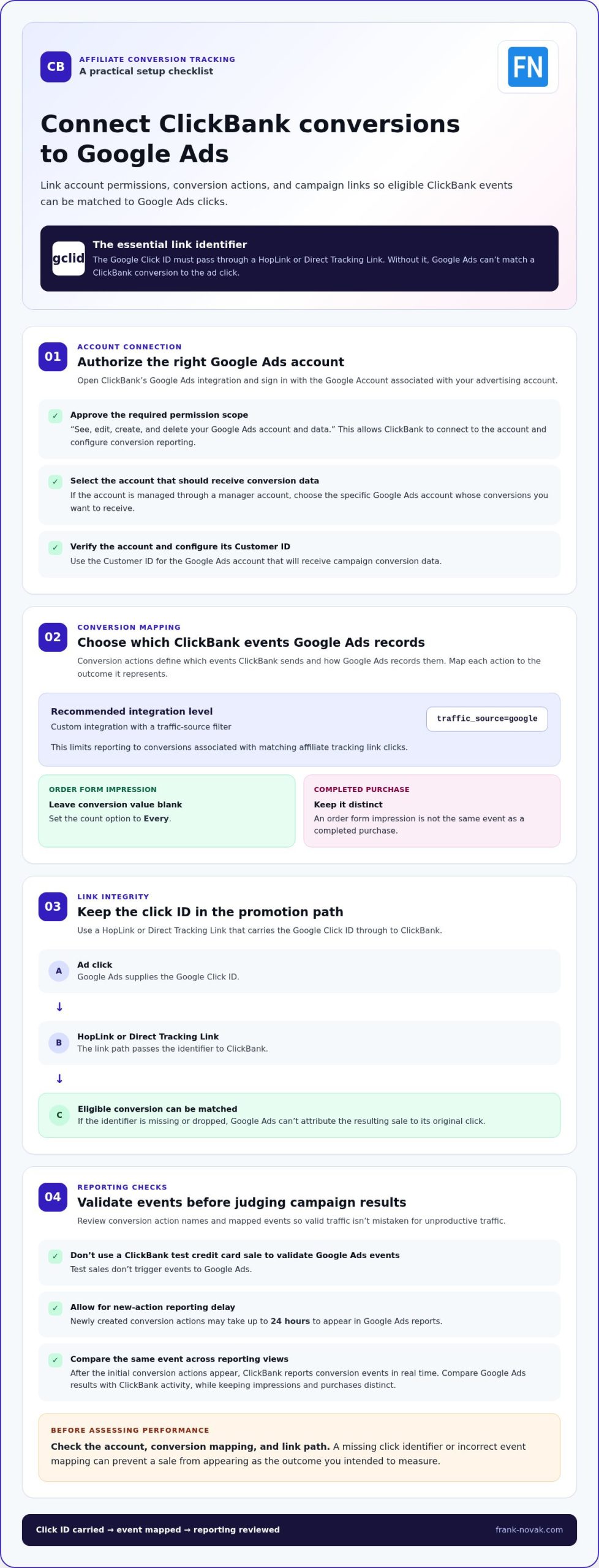
ClickBank can report affiliate conversions to Google Ads when the tracking link carries the Google Click ID, or gclid. The setup connects a Google Ads account to ClickBank, maps conversion actions, and passes click data through a HopLink or Direct Tracking Link. Without the gclid, Google Ads can’t match ClickBank conversions to the ad click.
Start by opening ClickBank’s Google Ads integration and signing in to the Google Account associated with your advertising account. During authorization, enable the permission scope named “See, edit, create, and delete your Google Ads account and data.” This permission lets ClickBank connect to the account and configure conversion reporting.
- Authorize the account. Sign in to the relevant Google Account and approve the required permission scope. If the account is managed through a manager account, select the Google Ads account whose conversions you want to receive.
- Complete account verification. After permission approval and verification, configure the Google Ads Customer ID in ClickBank. Use the Customer ID for the account receiving campaign conversion data.
- Map conversion actions. Choose the Google Ads conversion actions that correspond to ClickBank events. Mapping defines which events ClickBank sends and how Google Ads records them.
- Choose the integration level. ClickBank recommends the Custom integration level, with a filter for
traffic_source=google. This limits reporting to conversions associated with matching affiliate tracking link clicks.
Next, make sure the links you use to promote an offer can carry the gclid. ClickBank accepts conversions only when the Google Click ID passes through a HopLink or Direct Tracking Link. Keep the campaign link path consistent: if the identifier is missing or dropped, Google Ads can’t attribute the resulting sale to its original click.
ClickBank’s Google Ads conversion action for order form impressions requires a specific setup: leave the conversion value blank and set the count option to Every. An order form impression is different from a completed purchase, so keep its action separate from sale-related conversion mapping. This makes each measured event easier to interpret.
Finally, don’t use a ClickBank test credit card sale to validate Google Ads conversion events. Test sales don’t trigger events to Google Ads. After the initial conversion actions appear in reporting, ClickBank reports conversion events in real time. Review action names and mapped events before assessing campaign performance, since an incorrect mapping can make valid traffic appear unproductive.
Importing affiliate conversions into Google Ads
Importing ClickBank conversions gives Google Ads information beyond ad clicks, helping you assess whether paid traffic leads to affiliate sales. After the conversion actions are mapped, ClickBank sends matching events to the account, where you can compare campaign activity with recorded outcomes. Newly created conversion actions may take up to 24 hours to appear in Google Ads reports.
For a useful comparison, tie each conversion action to a clearly defined event. An order form impression and a completed purchase represent different stages, so don’t treat them as equivalent results. Google Ads can use conversion data to inform campaign decisions, while ClickBank reporting helps you identify which affiliate activity produced the tracked event. Allow for reporting delays before changing a campaign based on a newly created action.
How does Google Ads compare with other traffic sources for ClickBank affiliates? Paid search can provide a faster way to test whether an offer and landing page attract buyers, while organic traffic develops through content and search visibility. One guide estimates that paid advertising can validate an affiliate strategy in about 6 weeks, compared with about 6 months for organic traffic sources.
Can Google Ads link directly to a ClickBank affiliate URL? Yes. You can use a HopLink or Direct Tracking Link, provided the Google Click ID passes through to ClickBank. The identifier connects an ad click with an eligible conversion, so the link path matters as much as the destination.
What landing page requirements apply to ClickBank affiliate ads on Google? Build the page around one clear action, such as learning about the offer before proceeding to its sales page. Keep the ad’s keywords and claims consistent with the landing-page content, and make the next step clear instead of sending visitors to an unrelated page.
What are the risks of promoting ClickBank products with Google Ads? A missing click identifier can leave a sale unattributed, while a mismatch between the ad and page can waste traffic or disrupt the visitor’s path. Before promoting an offer, confirm that its affiliate program is active and that the landing page accurately reflects what visitors will find.
Affiliate eligibility depends on the vendor’s active program and offer terms. Google Ads eligibility depends on whether the ad and destination meet platform requirements. Treat these as separate checks: an available ClickBank offer doesn’t automatically make every ad or landing page suitable.
A practical review should connect the campaign, link, and reporting view. Check that the conversion action represents the event you intend to measure, then compare Google Ads results with ClickBank activity after reporting begins. For a more structured affiliate marketing approach, explore affiliate marketing guidance.
Optimizing paid campaigns with conversion data
To promote a ClickBank product with Google Search Ads, build a focused campaign around relevant searches, a matching landing page, and a defined conversion goal. For Google Ads for ClickBank products, use recorded conversions to decide which keywords and traffic merit further investment.
Campaign Setup and Goals
Start with one offer and one campaign goal, such as measuring completed affiliate sales. Keep the target action separate from earlier steps, like an order form impression, so campaign results answer a clear business question. For example, if your goal is sales, use the purchase-related conversion action to assess which searches contribute to revenue.
Set a baseline before changing bids or targeting. Google Ads conversion actions can take up to 24 hours to appear in reports after they’re first created, so avoid treating an empty initial report as proof that tracking failed. Once results are visible, use the campaign goal to guide each adjustment.
Search Campaign Structure
Organize search campaigns around meaningful differences in intent. Group closely related keywords in the same ad group, then make the ad copy and landing page relevant to that group. A search for product reviews, for example, calls for messaging that suits a review-focused page rather than a broad product pitch.
Choose exact, phrase, and broad match based on how closely you want to control search relevance. Add negative keywords when search terms don’t fit the offer, and review the terms triggering your ads before expanding coverage. This structure helps separate useful traffic from searches unlikely to lead to your intended action.
Performance Tracking
Review conversions alongside clicks, search terms, and the landing-page action. If a keyword attracts visits but no tracked outcomes, examine its intent and the page experience before raising its bid. One affiliate reported 42 clicks without a conversion; that example illustrates why clicks alone don’t establish campaign value.
Wait for reporting to populate, then compare conversion patterns across ad groups. A return on ad spend (ROAS) of at least 1.0 is a guide’s recommended optimization target, but calculate it using the revenue and advertising spend relevant to your own campaign. Don’t confuse an order form impression with a sale.
Conversion data can also inform audience decisions. Compare available audience segments against your campaign’s primary goal, and adjust targeting only when the reporting supports the change. If a segment brings visits but not the action you measure, review its search intent and landing-page fit before excluding it.
Use a steady optimization loop: inspect search terms, identify relevant and irrelevant traffic, refine keywords or negatives, and review conversions again. Google Ads for ClickBank products is easier to evaluate when you measure each campaign against clear outcomes, while ClickBank data adds context about affiliate sales. Make one clear change at a time so you can understand what affected performance.
Attributing HopLinks, Tracking IDs, and SubIDs
ClickBank attribution depends on connecting an ad click to the affiliate link and subsequent conversion. A HopLink identifies the affiliate referral path, while Tracking IDs and SubIDs help distinguish traffic sources in your reporting. For Google Ads, the Google Click ID, or gclid, must also pass through a HopLink or Direct Tracking Link for conversions to be accepted.
Keep the roles of these identifiers separate. The gclid links a Google Ads click with a reported conversion. A Tracking ID or SubID adds a label you choose, such as a campaign, ad group, or landing-page variant. That label helps you compare affiliate activity in ClickBank, but it doesn’t replace the gclid or independently show which ad generated a sale.
Choose a consistent naming method before promoting an offer. For example, label paid search traffic with a value such as google_search_review, then use distinct labels for different campaign themes. Keep values descriptive and readable so ClickBank reporting can answer practical questions without requiring you to decode inconsistent abbreviations.
- Create the link. Generate the ClickBank HopLink for the offer and affiliate account you’re promoting.
- Add a tracking label. Assign a Tracking ID or SubID that identifies the campaign source or test.
- Preserve click information. Use the HopLink or Direct Tracking Link in a path that passes the gclid to ClickBank.
- Review results together. Compare the ClickBank label with Google Ads campaign data and reported conversions.
For a simple comparison, use one label for a review-focused search campaign and another for a comparison-focused campaign. If both labels produce visits but only one is associated with reported conversions, investigate its keywords, ad message, and landing-page fit. This ties your analysis to campaign differences instead of treating all affiliate traffic as one source.
ClickBank recommends the Custom integration level with a traffic_source=google filter. This filter helps limit Google Ads reporting to conversions from matching affiliate tracking-link clicks. Pair it with consistent labels: the filter identifies eligible Google-originated activity, while the Tracking ID or SubID helps distinguish campaign segments.
If results seem inconsistent, trace a click from the ad through to the report. Check whether the ad uses the intended HopLink, whether the gclid survives the redirect, and whether the expected label appears in ClickBank reporting. A missing gclid can prevent Google Ads from accepting the conversion; a missing or reused label can make campaign comparisons difficult. Keep link naming, campaign naming, and conversion mapping aligned as you expand your Google Ads tests.
Bidding, location, and audience targeting
For Google Ads campaigns, set bids and targeting around the searches, locations, and audiences that produce useful outcomes. Treat each adjustment as a test: define the segment, review its conversions, then adjust bids or reach based on the evidence.
Start with the United States campaign location settings and the offer’s intended audience. A nationwide campaign can conceal differences between regions, devices, and search intent. Review those segments separately in Google Ads reporting, then narrow or adjust targeting only when conversion results support the change.
Base bid decisions on conversion quality, not click volume alone. If a keyword or audience segment generates visits without the action you measure, inspect its search intent and landing-page fit before increasing its bid. If another segment produces relevant conversions, compare its cost and revenue contribution before shifting more campaign budget toward it.
- Location: Compare regions within the United States using the same conversion goal.
- Device: Review desktop, tablet, and smartphone outcomes separately.
- Audience: Use available audience segments to interpret performance, not as a substitute for relevant search intent.
- Bid: Adjust based on recorded conversions and the value those outcomes contribute.
Keep platform benchmarks in context. One guide recommends a $0.60 CPC for U.S.-wide native advertising on desktop and tablet, and $0.35 for smartphones. Those figures describe native ads, not Google Ads bids, so don’t transfer them directly into a Google Search campaign. Google Ads bids should respond to your campaign’s actual search and conversion data.
The same distinction applies to publisher-section adjustments. The guide suggests bidding up 30-35% for higher-converting native-ad sections and down about 50% for lower-converting sections. Those recommendations apply to native placements. In Google Ads, use the available campaign and segment reporting to decide whether a bid adjustment fits your own setup.
For a practical test, compare one audience or location segment with the rest while keeping the conversion goal consistent. Record the targeting change and its date, then review the next reporting period for conversion quality and cost. If results change, consider whether the difference came from location, device, audience, or a simultaneous campaign edit.
Google Ads targeting works best when every segment has a clear purpose. Keep the U.S. location, device details, and audience settings aligned with the offer and landing page. Use negative keywords to exclude irrelevant searches, and don’t widen reach simply to increase clicks. The aim is a controlled campaign that shows which traffic merits continued investment.
Frank Novak: Online Success Coaching
Frank Novak’s Online Success Coaching is a natural next step if you want help turning these campaign mechanics into a clear affiliate marketing plan. Bring questions about choosing a ClickBank offer, structuring Google Ads, tracking conversions, or deciding what to optimize first. Coaching can help you work through those decisions in context, especially when you’re moving from setup to campaign review and need a more organized process.
It’s also relevant if you’re shaping your online business approach and want guidance alongside your affiliate efforts. The goal is to help you understand the steps and make informed decisions, not to promise a particular advertising result.
Visit frank-novak.com to learn more.
Take Your Next Campaign Step
Turn your campaign notes into a working plan by choosing one decision to improve next. You might refine the fit between your offer and audience, review how you’ll measure progress, or set a clear purpose for your next test. A focused next step makes Google ads for ClickBank products easier to manage because every change has a reason and a result to assess.
If you want support shaping that plan, Frank Novak’s Online Success Coaching can help you think through your affiliate marketing direction. His ClickBank Super Funnel and Never Succeed Online are also resources to explore as you develop your online business approach. Choose the guidance that fits your current stage, then keep building your knowledge with practical, deliberate steps.
Your next campaign doesn’t need to be perfect to be useful. Start with a clear objective, learn from the results, and keep moving forward with confidence.
Frequently Asked Questions
Why Use Google Ads?
Google Ads can put an offer in front of people already searching for a related solution. For affiliate marketers, search intent matters: someone comparing products may be closer to a decision than someone browsing casually. Search-term and conversion reports can also show which messages attract relevant visitors. The value comes from matching the offer, the search, and the destination, not simply increasing traffic.
Can you run Google Ads for ClickBank products?
Yes, you can advertise ClickBank offers with Google Ads when the campaign and destination meet Google’s applicable requirements. Before promoting an offer, confirm that its affiliate program is active and understand the vendor’s terms. Then decide whether your ad leads to a useful review or information page, or directly to the offer through an affiliate link. Give searchers a clear, relevant next step on the page.
What are Google’s policies for affiliate marketing and ClickBank ads?
Google’s requirements apply to both the ad and the destination, so affiliate status alone doesn’t determine whether a campaign is suitable. Keep ad claims accurate and consistent with the page, and clearly explain the relationship between your content and the promoted offer. For example, a product review should provide meaningful information, not function only as a thin route to a sales page. Product category and destination content also matter.
How do you find profitable ClickBank products to advertise with Google Ads?
Look for an active affiliate program, an offer that fits a defined audience, and a sales page that supports the ad’s message. ClickBank’s Gravity score reflects publishers who made sales in the preceding 12 weeks, so treat it as one demand signal, not a profit forecast. Compare the offer’s commission structure with your likely advertising expenses, and assess whether searchers can understand its value before clicking through.
What Google Ads keywords and bidding strategies work for ClickBank offers?
Begin with search terms that clearly relate to the product, such as a brand comparison or a specific problem the offer addresses. Separate different intentions into relevant ad groups, then review search-term reports for mismatches. Use bids to manage traffic in a controlled way, adjusting them in response to tracked outcomes and sales value. Add negative keywords when queries attract visitors unlikely to want the offer.
How much does it cost to advertise ClickBank products on Google Ads?
There’s no single advertising cost for a ClickBank offer. Google Ads spend depends on auction competition, keyword selection, targeting, bid settings, and the amount of traffic you choose to pursue. Decide what you can spend while gathering useful campaign data, then monitor clicks alongside affiliate conversions. A low click cost alone doesn’t make a campaign efficient if visitors don’t take the intended action.
What conversion rates and ROI can ClickBank Google Ads campaigns expect?
Conversion rates depend on the offer, search intent, landing-page experience, and how accurately tracking captures affiliate sales. Estimate performance from your own campaign data rather than applying a universal rate. Calculate return on ad spend by comparing attributed revenue with advertising spend; one guide recommends a ROAS of at least 1.0 as an optimization target. Use that as a measurement reference, not as a prediction for every offer or campaign.
What are common reasons Google Ads rejects ClickBank affiliate campaigns?
Campaigns can run into problems when ad claims don’t match the destination, the page offers little value beyond redirecting visitors, or the promoted content conflicts with requirements for its product category. Broken pages and unclear offer descriptions can also undermine the visitor experience. Review the ad and destination as one journey: a search for a product review should lead to content that genuinely explains the offer and supports its claims.

Article by
Frank Novak
Frank Novak is an online marketing professional and coach who focuses on affiliate marketing and business automation. Through his website, frank-novak.com, he shares insights and strategies for leveraging social media platforms like Facebook to generate traffic and commissions.
Affiliate / Sponsored Content Disclaimer
This [website/post] contains affiliate links. If you click through and make a purchase, we may receive a commission at no additional cost to you. We only recommend products or services we believe will add value to our readers.