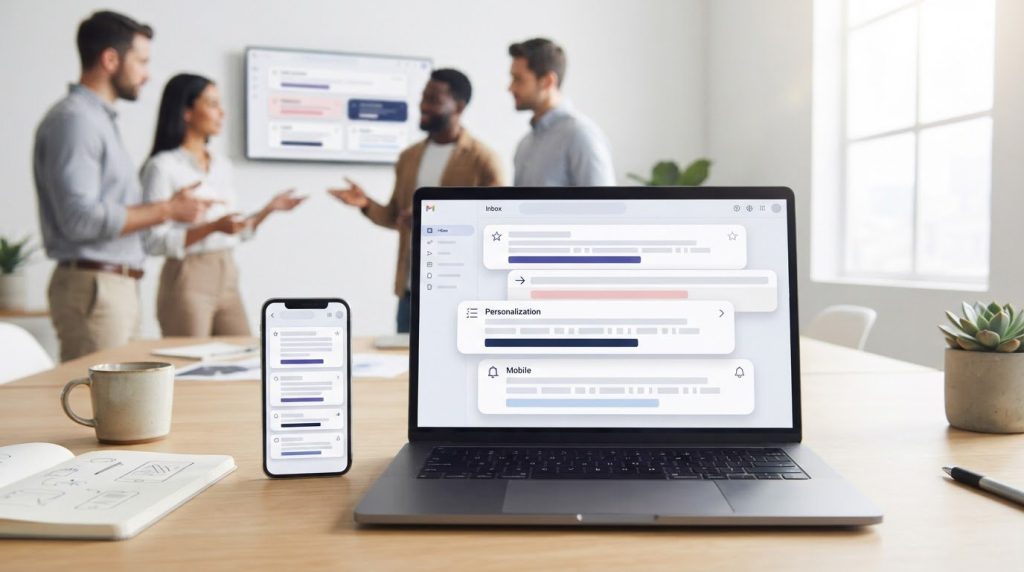

Shorter isn’t always better, but a long subject line can hide its point. For writing email subject lines that get opened, start with 30-50 characters and put the most important words first. Mobile inboxes may show only about 30 characters, so the opening words need to make sense on their own.
It’s natural to focus on length when you want readers to open an email, but a short subject line won’t help if it doesn’t show what’s in it for them. Strong subject lines pair a clear benefit with wording that fits the screen and feels relevant to the recipient. This guide explains how to choose a useful length, personalize thoughtfully, and write benefit-led subject lines that give readers a clear reason to open.
Key Takeaways
- Test personalized wording against a simple alternative to learn what feels relevant to your audience.
- Compare subject-line variations and track results over time instead of relying on a single successful send.
- Use urgency, uniqueness, specificity, and usefulness to make each subject line more compelling without misleading readers.
- Lead with the reader’s benefit in how-to subject lines, rather than focusing only on the steps they’ll need to take.
- Make the subject line’s main point clear at a glance so readers can quickly understand why the email matters.
1. Does personalising subject lines with names increase open rates?
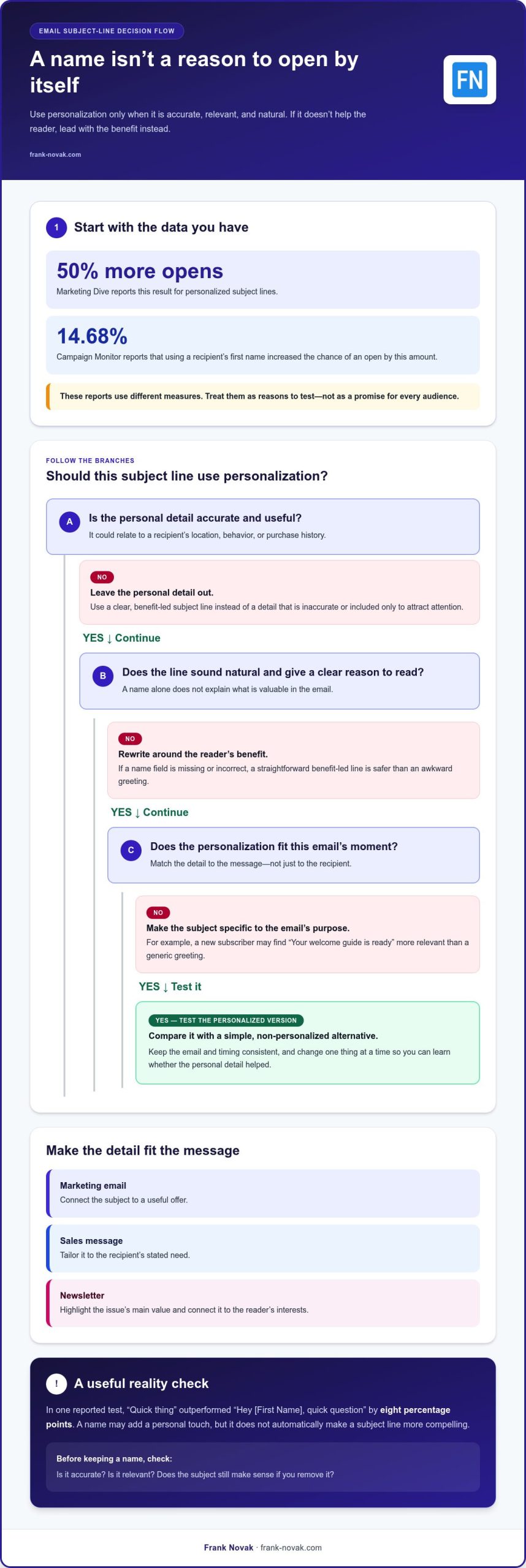
Personalization can help a subject line feel relevant, but a recipient’s name isn’t an automatic reason to open. Marketing Dive reports that personalized subject lines get 50% more opens, while Campaign Monitor reports that using a recipient’s first name increased the chance of an open by 14.68%. These reported results use different measures, so treat them as evidence to test, not a promise for every audience.
A name works best when it sounds natural and the email offers a clear reason to read. Compare “Maya, your guide to email testing” with “Quick thing.” In one reported test, “Quick thing” outperformed “Hey [First Name], quick question” by eight percentage points. The example shows why adding a name alone may not make a subject line more compelling.
Marketing emails, sales messages, and newsletters call for different approaches. For marketing, connect the subject to a useful offer; for sales, tailor it to the recipient’s stated need; for newsletters, highlight the issue’s main value. In every case, use urgency only when the email gives readers a genuine, time-sensitive reason to act.
Personalization can draw on location, behavior, or purchase history. A location-based example might be “Seattle event details for Saturday,” if the event is relevant to the recipient. A behavior-based line could say, “Still exploring email automation?” after someone views related content. A purchase-based message might offer setup guidance for a product the recipient bought. Use personal details only when they’re accurate and useful, not merely to attract attention.
Triggered emails follow a defined action, such as signing up or abandoning a cart, so the subject should fit that moment. “Your welcome guide is ready” is more relevant to a new subscriber than a generic greeting. For a newsletter, connect the regular format with the reader’s interests, as in “Maya, this month’s email planning tips.” The subject should still make sense if you remove the name.
Start by learning what your audience values: review the questions they ask, the content they engage with, and why they subscribe. Then test one change at a time, such as using a first name or leaving it out, while keeping the message and timing consistent. If a name field is missing or inaccurate, a clear, benefit-led subject line is safer than an awkward greeting. Relevance, accuracy, and a natural tone are essential when writing email subject lines that get opened.
2. How long should an email subject line be?
For a data-backed starting point, subject lines between 61 and 70 characters had the highest reported open rate, 43.38%, and click-through rate, 17.57%. That finding doesn’t make the range a rule for every campaign. Email providers cut off subject lines at about 60 characters on average, so a longer line may hide its ending. Put the main idea early, then test whether extra detail earns its place.
A/B testing compares two versions against a clear goal. Try a concise subject line against one with a specific benefit, such as “Plan your next campaign” versus “Plan your next campaign in less time.” Keep the email, audience, send timing, and sender name consistent. Change several elements at once, and you won’t know which one influenced the response.
Before sending, choose an outcome to measure. Open rate can show which subject line attracted attention, while click-through rate indicates whether subscribers engaged with the email. If the goal is a purchase or sign-up, track that action as well. A subject line can win opens without attracting readers who care about the email’s content.
Use a simple testing process:
- Write two subject lines that differ in one meaningful way, such as length, benefit, or wording.
- Split comparable subscribers between the versions, rather than sending each version to a different audience.
- Compare the chosen engagement measure after both versions have had time to receive responses.
- Record the result and use it to shape a future test, not as a permanent formula.
Keep testing over time. A subject line that worked once may not perform the same way for another topic, audience, or send. The reported finding that 61-to-70-character lines led in one dataset should guide an experiment, not replace your own results. Only 47% of marketers reportedly test subject lines regularly, making a consistent testing habit a practical way to learn from your subscribers.
For each campaign, save the subject line, its length, the audience, and the result in a simple log. After several sends, look for patterns: perhaps a direct benefit works better for product updates, while a specific question suits educational emails. If you’re also refining the wider marketing plan, explore online marketing guidance as a complementary resource.
3. Applying the 4 Us: urgency, uniqueness, specificity, and usefulness
The 4 Us give you a practical check before sending: urgency, uniqueness, specificity, and usefulness. Each should help the reader understand why this email matters now. For example, “A simple way to plan your next campaign” offers a clear benefit, while “You won’t believe this” relies on curiosity without explaining the value inside.
Urgency can encourage action when a real deadline or timely opportunity exists. Urgent subject lines are reported to increase opens by an average of 22%, but that doesn’t justify inventing a deadline. “Register by Friday for the live workshop” is appropriate only if registration actually closes Friday. False urgency can weaken trust and make future messages easier to ignore.
FOMO, or fear of missing out, works best when it reflects a genuine limitation that matters to the recipient. Describe a real constraint, such as limited places at a relevant event, rather than applying pressure with vague claims. Campaign Monitor advises using scarcity only when an offer is relevant to the reader. Without a meaningful deadline or limit, focus on usefulness instead.
Uniqueness and specificity help a subject line stand apart from generic inbox language. Replace “Marketing update” with “A checklist for improving your welcome email,” if that accurately describes the message. Numbers can make a promise easier to picture; their use in subject lines is reported to increase open rates by up to 57%. Keep the number truthful and make sure the email delivers what it suggests.
Use these formulas as starting points, then tailor them to the audience and message:
- Question: “Is your welcome email easy to follow?” Use a question when the email provides a clear answer; Belkins found question-based subject lines achieved a 46% open rate.
- Number: “Three ways to simplify campaign planning.” Make sure the email includes the promised number of ideas.
- Benefit: “Make your weekly email easier to write.” Name an outcome the reader can expect from the content.
- Urgency: “Last day to register for the workshop.” Use this only when the deadline is real and relevant.
Before sending, check each U against the email itself. Does the subject identify something distinctive, explain the topic clearly, and offer value to the reader? Is any urgency or scarcity accurate? A curiosity gap can encourage an open, but the email should answer the question promptly. This quick review keeps the subject compelling without promising something the message can’t deliver.
4. Email subject-line length and mobile truncation
Nearly 50% of emails are opened on mobile devices, where a long email subject line may lose its ending. Mobile inboxes commonly cut off subject lines at about 30 characters, while Gmail and Yahoo web views usually truncate them around 55 characters. Put the core message first, so readers can understand it before any cutoff.
A practical starting range is 30-50 characters, with the most important words near the beginning. For example, “Plan next week’s email campaign” delivers its topic early, while “A few thoughts about something we’ve been working on” delays the point. Keep the line clear, accurate, and connected to the email’s contents.
Recommendations vary: one guide suggests 6 to 10 words or fewer than 70 characters, while Omeda reports that subject lines with 20 characters or fewer outperform longer ones. These ranges aren’t interchangeable rules. A short line can work when the benefit is obvious; a longer one can add useful detail if the key information remains visible.
To check truncation, preview the same subject on a phone and in a desktop inbox. Count characters, including spaces, then review how the first 30 characters read on their own. For example, “Your guide to email planning” still communicates a topic if the display ends early. Avoid placing a deadline, product name, or benefit at the very end.
AI tools can suggest alternatives, but treat each one as a draft. Give the tool the email’s purpose, audience segment, and main reader benefit. Request concise options in different styles, then remove generic phrases and check every claim against the message. For an email about a planning checklist, compare “Get your campaign checklist” with a more specific, accurate, benefit-led version.
Measure performance with more than open rate. Apple Mail Privacy Protection can inflate reported open rates, so an apparent increase may not mean more people are reading. Compare clicks, conversions, and other meaningful actions alongside opens. Review results by segment: a subject line that works for new subscribers may not suit returning customers.
Inbox filters and display affect what readers see, so use a recognizable sender name and a relevant subject. Avoid misleading wording and excessive punctuation, which can make a message seem less trustworthy. Test one change at a time, such as moving the benefit to the first few words, then compare engagement across similar sends.
A good subject line makes the email’s value clear before the reader opens it. Use the shortest wording that accurately sets expectations, and let mobile previews guide what comes first. If a longer phrase is necessary, preserve its essential meaning within the first 30 characters.
5. How-to subject lines focused on benefits
A how-to subject line names a task; a benefit-led version explains why the task matters. “How to organize your email calendar” describes a process, while “Plan next week’s emails in less time” highlights a reader outcome. Campaign Monitor advises focusing how-to subject lines on the benefit recipients will get, rather than the process. This shift helps the email compete on usefulness, not just clever wording.
Start with the email’s central takeaway, then express it in terms of the reader’s goal. If a campaign explains welcome emails, “How to write a welcome email” may be accurate, but “Help new subscribers feel at home” signals the intended result. Make the benefit specific enough to match the content. A subject line should set expectations the email can meet.
Campaign Monitor also advises using a low number when describing effort the reader must expend. For example, “Create a newsletter in 3 steps” makes the task sound manageable, provided the email really contains three steps. The number helps clarify the scope; the benefit explains why those steps matter. Avoid promising a quick conversion or effortless outcome unless the message supports that claim.
Use this simple drafting sequence for each message:
- Write the topic in plain language, such as “improve your welcome email.”
- Name the reader’s desired result, such as “help new subscribers take their next step.”
- Combine the topic and outcome: “Improve your welcome email to guide new subscribers.”
- Check that the email delivers the promised advice, example, or action.
Match the benefit to the campaign’s purpose. An educational email can promise clearer understanding, while a product message can explain a relevant use or advantage. For example, “Choose a subject line that sets clear expectations” fits a practical lesson. “See what’s new” is less useful unless the email says what changed and why the reader should care.
Test benefit-led wording against a process-led alternative, changing only the subject line. Compare open rate with click-through rate and conversions: an attention-getting promise should also attract the right readers. If opens rise but clicks fall, the subject may promise a benefit the email doesn’t deliver. Record the message, audience segment, and result to inform your next test.
Before sending, replace generic claims such as “amazing tips” with a concrete outcome. Read the subject alongside the email’s opening paragraph: both should make the same promise. A clear benefit can be more compelling than a clever phrase because readers can quickly judge whether it’s relevant.
Frank Novak: Online Success Coaching
If you’re applying email marketing principles while building an online business, Online Success Coaching can help you connect subject-line improvements with broader affiliate marketing and business automation goals. It offers a natural next step if you want guidance developing your online business strategy, rather than another subject-line formula.
Bring a specific challenge, such as turning campaign ideas into a consistent marketing plan, and use the conversation to clarify your next steps. If you’d like to explore whether this support fits your goals, visit frank-novak.com.
Make your next email a focused experiment
Rather than searching for one perfect formula, give each campaign a clear learning goal. Decide what you want the reader to do, then shape the subject line around that action. Writing email subject lines that get opened is an ongoing practice, guided by audience response rather than guesswork.
For your next send, note why you chose the wording: perhaps you’re testing a clearer benefit, a more relevant angle, or a different tone. Afterward, use the results to choose one adjustment for the following message. Small, deliberate refinements can help you build a subject-line approach that fits your audience and business.
If email is part of a broader online marketing plan, consider how each message supports the reader’s next step. A useful subject line sets expectations, and the email itself should deliver on them.
Keep learning from each campaign, and let your next thoughtful test move your marketing forward.
Frequently Asked Questions
How long should an email subject line be?
A useful starting point is 30-50 characters, but the best length depends on the message and audience. One reported dataset found that subject lines between 61 and 70 characters had the highest open rate, at 43.38%. Since email providers often truncate longer lines, put the essential promise first. Compare a concise version with a more detailed one, and judge both against the same campaign goal.
Do emojis help or hurt email open rates?
Emojis can attract attention, but their effect depends on the audience and context. Nielsen Norman Group found emojis increase negative sentiment toward emails by 26%, while Experian reported that 56% of brands using emojis saw higher open rates. These findings measure different outcomes, so they aren’t contradictory guarantees. If an emoji fits your message, test one relevant symbol against a text-only version and review the response.
Does personalising subject lines with names increase open rates?
Using a recipient’s name may help, but it doesn’t guarantee more opens. Campaign Monitor reports that adding a first name increased the chance of an open by 14.68%. Try a name in a natural, useful subject line, then compare it with a version that leads with the email’s benefit. Check that names display correctly, and avoid a greeting that makes the message feel automated or inaccurate.
What words trigger spam filters?
No single word reliably determines whether an email reaches the inbox. Filters may consider message context, sender reputation, and recipient engagement, so a misleading subject line or exaggerated promise can undermine trust. Rather than relying on a supposed blacklist, describe the email accurately. For example, use “Your account update” only for a genuine account update, not to disguise an unrelated promotion.
What makes an email subject line more likely to be opened?
A relevant subject line makes the email’s value easy to understand before opening. Name a concrete outcome, such as “Prepare your launch checklist,” rather than a generic phrase like “News for you.” The preheader can add context without repeating the subject. Coordinated subject and preheader pairs are reported to outperform standalone subjects by 20-30% in open rates, so make the two lines work together.
What is the ideal email subject line length for desktop and mobile?
For mobile, keep the most important words within the first 30 characters, since mobile inboxes commonly truncate around that point. Gmail and Yahoo web views usually cut off subject lines at around 55 characters. Desktop displays vary, so preview your message in the email clients your subscribers use. If the first phrase still communicates the topic, the subject remains understandable when the rest disappears.
Do personalized email subject lines improve open rates?
Personalization can extend beyond a first name: a subject can reflect a subscriber’s location, recent behavior, or purchase history. Marketing Dive reports that personalized email subject lines get 50% more opens than non-personalized ones, but relevance matters more than inserting a detail for its own sake. For example, reference a guide someone requested, and make sure the email delivers that promised information.
Do emojis, numbers, or questions increase email open rates?
Each can help in the right context, but none works as a universal shortcut. Using numbers is reported to increase opens by up to 57%, and Belkins found question-based subject lines achieved a 46% open rate. Emojis can affect sentiment differently across audiences. Test one element at a time, keep the email content consistent, and compare meaningful engagement rather than choosing a style based on a single result.

Article by
Frank Novak
Frank Novak is an online marketing professional and coach who focuses on affiliate marketing and business automation. Through his website, frank-novak.com, he shares insights and strategies for leveraging social media platforms like Facebook to generate traffic and commissions.
Affiliate / Sponsored Content Disclaimer
This [website/post] contains affiliate links. If you click through and make a purchase, we may receive a commission at no additional cost to you. We only recommend products or services we believe will add value to our readers.