

A resource page works best when it helps readers choose, not just click. To learn how to create a resource page for affiliate links, group products and tools you genuinely recommend on a clear, branded page, explain what each one is useful for, and place a visible disclosure near the first affiliate link.
It’s natural to wonder whether a resource page will feel too sales-focused. The difference is in the recommendations: make them relevant to your audience, add useful context, and don’t endorse a product just because it pays a commission.
This guide explains how to plan the page, organize links for easy browsing, and write honest descriptions and disclosures. You’ll also learn how to make the page feel like a natural part of your brand, so it becomes a useful reference rather than a bare list of links.
Key Takeaways
- Organize recommendations around your audience’s needs, and give each link enough context to help readers decide whether it’s relevant to them.
- Use clear, descriptive link text that fits naturally into the surrounding content.
- Shape the page’s layout and language around your brand so it feels like a useful resource, not a generic list of links.
- Include worthwhile options even when they don’t earn a commission to keep recommendations balanced and reader-focused.
- Make affiliate relationships easy to recognize, with a clear disclosure placed where readers are likely to see it.
Building valuable content before promoting products
Organize an affiliate resource page around readers’ needs, with clear categories, useful explanations, and easy-to-find links. For usability and conversions, make each recommendation simple to scan, relevant to its category, and supported by context that helps visitors decide what to explore.
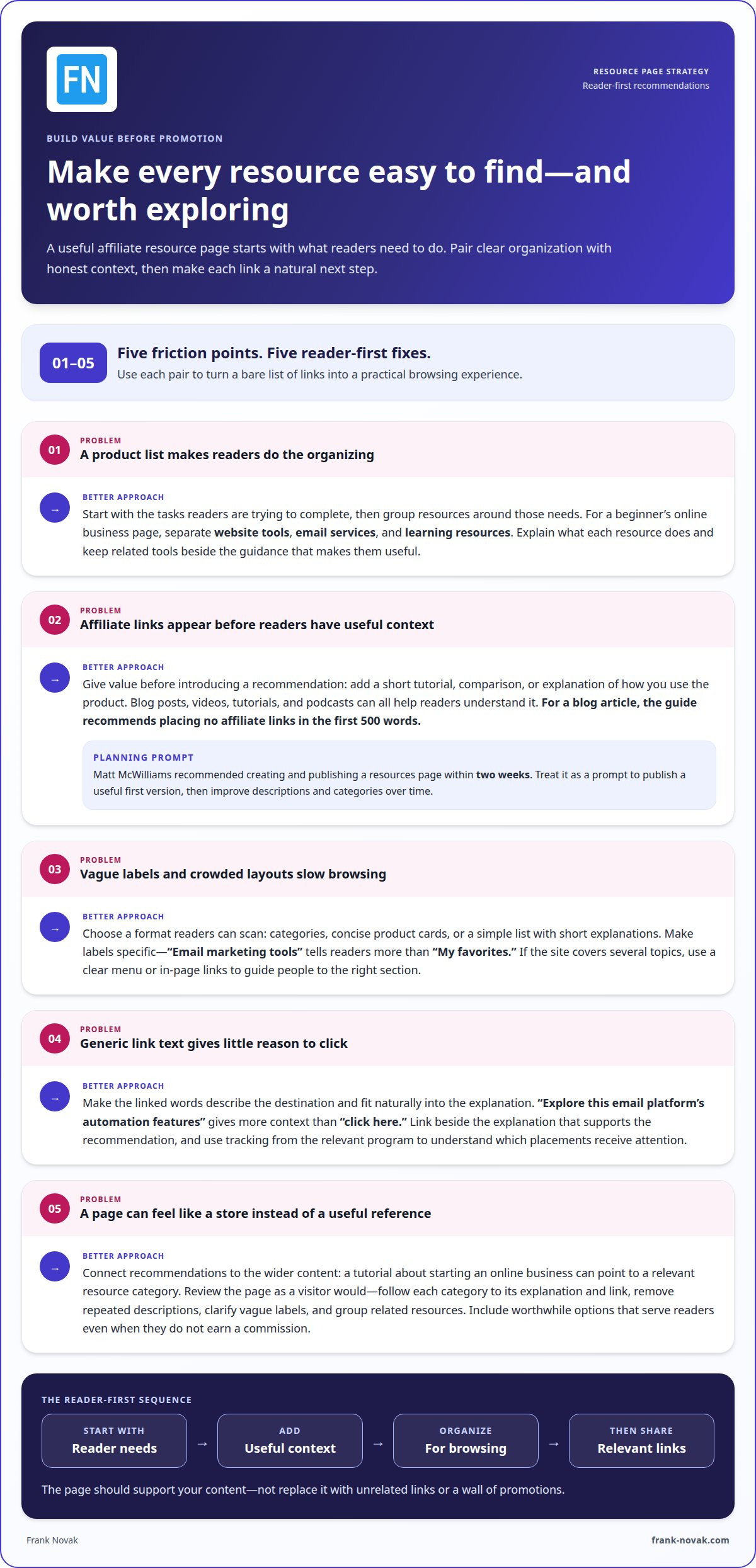
- Start with a reader problem, not a product list. Write down the tasks your audience is trying to complete, then group resources around those needs. For example, a beginner’s online business page might separate website tools, email services, and learning resources. This structure helps visitors find relevant options without scrolling through an unorganized product list.
Before adding a resource, explain what it does. If a tutorial teaches a process, place related tools beside that guidance instead of inserting unrelated links. A central resource page also makes useful links easier for you and your readers to find.
- Give value before introducing affiliate links. Add practical content such as a short tutorial, a comparison, or an explanation of how you use a product. Long-form videos, blog posts, tutorials, and podcasts can all help readers understand a recommendation. For a blog article, the page recommends placing no affiliate links in the first 500 words.
This approach encourages you to establish context before inviting readers to click. Matt McWilliams recommended creating and publishing a resources page within two weeks. Treat that as a planning prompt: publish a useful first version, then improve its descriptions and categories as your content develops.
- Choose a format that supports browsing. A resource page can use categories, concise product cards, or a simple list with short explanations. Keep the layout easy to scan and make section labels specific. “Email marketing tools” tells visitors more than “My favorites.” If your site covers several topics, use a clear menu or in-page links to guide readers to the right section.
Connect the page to your wider content. A tutorial about starting an online business can point readers to a relevant resource category. The page should support your content, not replace it with the feel of an online store or a wall of promotions.
- Write contextual anchor text. Make clickable words describe the destination and fit naturally into the sentence. “Explore this email platform’s automation features” gives more context than “click here.” Explain why the resource matters in the surrounding text, so the link feels like a useful next step rather than an interruption.
Use tracking from the relevant program to understand which placements receive attention, then refine the page based on what readers use. Search-focused copy can also help people find relevant resources organically. Google’s Helpful Content Update rolled out in September 2023, reinforcing the value of creating content for people rather than writing only to promote links.
- Review the page as a visitor would. Follow the path from a category heading to its explanation and link. Remove repeated descriptions, clarify vague labels, and group related resources. If readers need to compare options, show the differences in a compact table or consistent product cards.
Check that every recommendation serves the page’s purpose and your audience’s interests. Affiliate content should feel relevant, not salesy. A focused selection with helpful explanations gives readers a reason to use the page and gives you a stronger foundation for sustainable revenue.
Affiliate link disclosures and descriptive anchor text
- Make the disclosure visible before readers click. In the United States, publishers must clearly and conspicuously disclose when a brand compensates them for promoting a product. Put a plain-language disclosure near the first affiliate link instead of hiding it in a footer or on a separate page. For example: “I earn a commission if you apply through my link, but this does not cost you anything extra.” Readers should understand the relationship before deciding to click.
Keep the notice close enough to the recommendation that its meaning is clear on desktop and mobile. If the page starts with a product grid, place the disclosure above it. If the first affiliate link appears in a review, put the notice beside that link.
- Write anchor text that explains the destination. Choose words that describe the linked product or next step. “See the project-planning software I use” gives more context than “click here.” Explain why the resource matters, and link to a relevant feature page rather than a broad, unrelated destination.
Use a clear call to action without overstating the benefit. “View the course details” sets an accurate expectation; “Get guaranteed results” makes a promise the link cannot support. When sharing the resource on social media, keep the link description consistent with the destination and include a disclosure.
- Use short links only when the program permits them. A vanity link or URL shortener can make a long affiliate link tidier. Before using one to cloak a link, confirm that the affiliate program approves that method. Affiliate link cloaking is usually configured as a 302 redirect, which sends visitors to the destination while retaining a redirect path.
Record each shortened link’s destination and program. For example, label a link “email tool” in your tracking sheet, then test that it reaches the intended page. Copy the original affiliate link exactly when setting up redirects, because changing it can disrupt tracking or lead to a broken destination.
- Place links where the recommendation earns attention. Add an affiliate link beside the explanation that supports it, not in every paragraph. A tutorial about choosing an email platform might include one link after comparing the relevant feature. This gives readers useful context and keeps the page from feeling crowded.
There’s no universal link count that suits every page. Review the content, remove repeated links that offer no new choice, and keep links connected to the reader’s task. Track clicks and conversions by placement, then adjust calls to action if a section gets attention but few meaningful visits.
- Keep links useful across the full visitor journey. A resource page can point readers to a detailed explanation, while a related email or social media post introduces that resource with matching context. If you’re developing a broader affiliate marketing approach, Frank Novak’s online marketing resources can help connect link practices with your wider business content.
Before publishing, test every affiliate link and check its visible label. Confirm that the disclosure appears near the first link, the anchor text describes its destination, and the link reaches the intended page. These checks make the path clearer for readers and support reliable tracking.
Customizing a resource page to match your brand
Build the page in sequence: choose a website platform, apply your brand style, organize resources, add approved affiliate links, then review tracking. A website builder can provide design tools and templates while handling technical details such as hosting. Tracking parameters supplied by a brand, affiliate network, or software can help track clicks and conversions.
Keep the page recognizable by using the same voice, colors, and heading style as your other content. For example, a practical tutorial site might use plain-language labels and concise resource summaries instead of polished sales copy.
- Choose a platform that supports your publishing needs. A website builder is one option: its templates and design tools can help you create a branded page without building the layout from scratch. If you already publish articles on a website, add the resource page there so readers can move naturally between tutorials and relevant recommendations.
Make the page easy to update. A simple category layout, such as “Planning,” “Email,” and “Learning,” gives readers a clear path through your resources. Choose a format that suits your current content, then expand it as your recommendations grow.
- Match the page to your existing brand. Use your usual tone, colors, and visual style, and keep headings and descriptions consistent. A personal finance creator might describe a budgeting tool in direct, practical language, while a design educator might explain how a creative tool fits into a project workflow.
A branded resource page can reflect your personality more closely than a generic link hub. Keep navigation familiar, use descriptive category labels, and make sure the page is easy to read on a phone. Aim for a coherent experience, not decoration that competes with your recommendations.
- Complete affiliate program applications accurately. Before generating links, identify the brands and networks that fit your audience. Describe your website, content, and promotional methods accurately in each application. For example, explain whether you publish tutorials or product comparisons so the program understands how you plan to introduce its offer.
Once accepted, the program or network provides a unique affiliate link or discount code. Organize the original details by brand and resource category. That record makes it easier to update a recommendation without mixing up tracking from different programs.
- Generate links for the right destination. Use the link supplied by the brand or network, and direct readers to a relevant page. If your explanation covers a specific feature, link to the related product page rather than a general homepage. A relevant destination reduces the steps between your recommendation and the information readers need.
Some affiliate software or networks let you add tracking parameters to a destination URL. These parameters can distinguish traffic sources or page placements. For example, separate tags for a resource page and a related tutorial can show which placement sends clicks without changing the recommendation itself.
- Review links and performance as the page evolves. Use reporting from the program, network, or software to compare clicks and conversions from tagged links. Check which resource categories attract attention, then improve the placement or description if readers aren’t moving forward. Treat each link as a measurable part of the page, not simply a button.
Use a consistent naming system for custom links, such as “planning-tool-resource-page” and “planning-tool-tutorial.” Before publishing changes, test that each link reaches its intended destination and retains its tracking information. Consistent labels make future updates easier and keep your affiliate marketing records organized.
Create the page with a website builder that offers templates and design tools, or add it to a website where you already publish articles. For tracking, use parameters supplied by a brand, affiliate network, or software.
Recommending useful products whether or not they pay commissions
A helpful resource page features products that suit your audience, clear reasons for recommending them, and practical details about using them. Include commission-based and non-commission options, then explain what each resource does and who may find it useful.
-
Focus Recommendations on Your Audience
Start with a need your audience has raised, then select resources that address it. For example, a beginner’s blogging page might feature a writing tool, a planning method, and a guide to organizing posts.
Check that each recommendation suits the reader’s experience and task. Avoid promoting advanced tools to newcomers without explaining the learning curve. A useful description clarifies who may benefit, what problem the product helps solve, and when another option might be a better fit.
-
Include Commission and Non-Commission Products
Include useful resources even when they don’t pay a commission. A mix of affiliated and non-affiliated options gives readers a broader choice and makes the page feel less driven by earning potential.
Review every item using the same standard: relevance to the audience, practical value, and a clear reason for inclusion. Matt McWilliams reported that about 50% of the links on his resources page were affiliate links, alongside 14 non-affiliate links. The exact balance can vary; usefulness should guide the selection.
- Write specific descriptions and personal endorsements. Explain what you use the product for, which feature matters, and who may benefit. For instance, rather than calling a planning app “great,” describe how its task lists help organize a weekly publishing schedule. Concrete examples give readers information they can apply to their own needs.
Keep personal experience distinct from general product claims. If you’ve used a tool for drafting, say so; don’t imply every reader will get the same result. Mention any limitation relevant to your recommendation so readers can judge whether the product suits their needs.
- Demonstrate a product with a useful walkthrough. A Loom video can show how you use a resource for a real task, such as setting up a project board or finding a feature. Explain the purpose before the demonstration, then narrate the steps viewers need to follow. The video should add practical detail rather than repeat the product description.
Keep the demonstration focused on one clear use case. Show the relevant screen, explain the decision you’re making, and note where the product fits into your process. Pair the video with a short written summary so readers can understand the recommendation without watching it.
- Review recommendations as your audience changes. Revisit the page when your content starts serving a new reader need. A resource that suits experienced creators may not help beginners, while a beginner-friendly guide may become less useful as your audience advances.
Use reader questions, comments, and tutorial topics to spot changing needs. Then update descriptions or replace items that no longer serve those needs. This keeps the page focused on useful recommendations, not just products that once seemed relevant.
Affiliate disclosures and transparency
In the United States, publishers must clearly and conspicuously disclose when a brand compensates them for promotion. The key point is simple: tell readers about the relationship where they can notice it before clicking an affiliate link.
-
Explain Affiliate Disclosures
Put a direct disclosure near the first affiliate link, then keep it visible beside recommendations. For example, write, “I earn a commission if you apply through my link, but this does not cost you anything extra.” Don’t rely on a footer, profile page, or vague label such as “partner link.” Readers should understand that an affiliate program may pay you when a purchase follows your link.
-
Avoid Common Mistakes and Risks
Review each page for missing disclosures, unclear wording, and links that don’t match their descriptions. A “view product details” link should lead to that product, not an unrelated offer. Hidden compensation information can leave readers unaware of your financial relationship, while inaccurate link labels can mislead them. Treat transparency and accurate destinations as essential publishing checks.
- Use disclosure language readers can understand. Choose plain words that explain how earning works, rather than relying on technical terms. “I may earn a commission if you purchase through this link” describes the relationship clearly. Some visitors may not know what “affiliate” means, so explain the relationship instead of assuming they do.
Keep the wording consistent across your resource page, reviews, and promotional posts. If a social media post includes an affiliate link, disclose the relationship in that post, too. A disclosure on a separate webpage may not inform readers about compensation beside a link they encounter elsewhere.
- Check placement on each screen size. Put the disclosure before or beside the first affiliate link, where readers can see it without searching. On a page with a product grid, place it before the grid. In an article with a link beside a recommendation, put the notice close to that link.
Review the page on a phone and desktop. For example, a notice visible above a desktop table may shift below it on a narrow screen. Adjust the layout so the disclosure stays near the recommendation and is easy to read alongside the affiliate link.
- Keep disclosure and link records together. Create a simple publishing record with the page name, affiliate program, link destination, and disclosure location. When you update a product or replace its link, review those details together. This helps prevent an old disclosure from becoming separated from a new recommendation.
Before publishing an edit, follow each link and compare its destination with the surrounding description. Then confirm that the compensation language remains visible. These checks reduce confusion for readers and keep your earning relationship clear as the resource page changes.
Frank Novak
Frank Novak offers affiliate marketing guidance for readers who want to connect a useful resource page with a broader online business. If you’ve organized your recommendations and clarified disclosures but need support planning your next steps, Online Success Coaching can help you work through your online business goals. Frank Novak also offers Never Succeed Online, ClickBank Super Funnel, and Clickbank Profit Club for readers exploring affiliate marketing and digital business resources.
When you’re ready to develop your approach beyond the page, consider how useful content and recommendations fit into your business. Contact Frank Novak to discuss how Online Success Coaching can support your online business goals.
Put your next resource page improvement into motion
Your resource page can evolve with your content and audience. Treat it as a working part of your online business: notice the questions readers ask, identify gaps in the resources you share, and update the page when your focus changes. This ongoing attention helps keep recommendations connected to what visitors need now.
Knowing how to create a resource page for affiliate links gives you a strong starting point. Next, decide how the page should support your wider business goals. You might refine its role in your content plan or consider how affiliate marketing fits into your approach to building an online business. Choosing one focused next step can make the work more manageable.
Keep building at a pace that works for you. Each thoughtful improvement can make your page a more useful part of your business.
Frequently Asked Questions
What is a Resources Page?
A resources page is a central place on a website where visitors can browse tools, products, and other recommendations. For example, a photography educator might organize resources into sections for camera gear, editing software, and learning materials. The page gives readers one place to return to for recommendations, while its categories help them find options for a specific task.
What is an Affiliate Link?
An affiliate link is a unique link connecting a publisher’s recommendation to an affiliate program or brand. If a visitor follows the link and makes a purchase, the publisher may earn a commission. For example, a gardening blog could link to a seed-starting kit through a participating program. The link’s tracking information helps connect the purchase with the publisher who referred the visitor.
How do you choose products and affiliate links for a resource page?
Start with your audience’s niche and the tasks your content helps them complete. Then consider programs from brands you know or explore relevant affiliate networks. For example, a home-cooking site might consider kitchen tools its readers need for recipes. Working with more than one brand can also reduce reliance on a single partner if that brand leaves its program.
Where should affiliate disclosures appear on a website resource page?
In the United States, clearly and conspicuously disclose when a brand compensates you for promoting a product. On a resource page, put the disclosure where readers will see it before or as they encounter affiliate recommendations. If you share an affiliate link in an email or social media post, disclose the relationship in that context, too, so readers don’t have to find another page to understand it.
What SEO best practices apply to affiliate resource pages?
Write useful, search-focused descriptions that match topics and questions your audience is likely to look up. For example, a tutorial about choosing a project-planning tool can support a resource page section about planning software. Organize related material into clear categories, and connect pages when it helps readers continue their research. Search visibility is a potential benefit of useful, optimized copy, not a reason to add unrelated recommendations.
Which website platforms and tools can create an affiliate resource page?
Add a resource page to your existing website or use a website builder with templates and design tools that can handle hosting. Tracking parameters from a brand, affiliate network, or software can help track clicks and conversions.

Article by
Frank Novak
Frank Novak is an online marketing professional and coach who focuses on affiliate marketing and business automation. Through his website, frank-novak.com, he shares insights and strategies for leveraging social media platforms like Facebook to generate traffic and commissions.
Affiliate / Sponsored Content Disclaimer
This [website/post] contains affiliate links. If you click through and make a purchase, we may receive a commission at no additional cost to you. We only recommend products or services we believe will add value to our readers.