

The best tools for tracking affiliate marketing expenses may not be affiliate trackers at all. When ad spend, software subscriptions, hosting, and content costs are scattered across cards, receipts, and accounts, it’s difficult to see what a campaign actually costs. Affiliate tracking tools can show clicks, conversions, and commissions, but they don’t necessarily keep a complete record of business expenses.
You need both sides of the picture: organized cost records and a way to compare spending with affiliate results. This roundup compares spreadsheets, bookkeeping software, receipt apps, and affiliate dashboards, then shows how to connect the data without confusing performance reporting with bookkeeping. You’ll also find a practical workflow for recording expenses and receipts, plus criteria for choosing a setup that fits your business. I earn a commission if you apply through my link, but this doesn’t cost you anything extra. This article is educational; I’m not providing personalized financial advice.
Key Takeaways
- Use bookkeeping tools to record expenses and supporting documents, then compare those costs with affiliate performance data.
- Tools for tracking affiliate marketing expenses include spreadsheets, bookkeeping apps, and dedicated affiliate dashboards, each with a different role.
- Choose a setup based on transaction volume, number of campaigns, bookkeeping habits, and how much manual entry you’re willing to do.
- Use a repeatable process for categorizing costs, saving receipts, and reviewing campaign spending.
- Before choosing a tool, check its current documentation for receipt capture, exports, integrations, access controls, and reporting.
What Do Tools for Tracking Affiliate Marketing Expenses Actually Track?
Affiliate expense tracking means recording business-related spending along with the details needed to understand and support each transaction. A useful record includes more than a monthly total: it connects the amount to its date, vendor, purpose, and receipt or invoice. For background on the business model and the parties involved, see What is Affiliate Marketing?
Keep expenses separate from income. An advertising charge is a cost; a commission payment is revenue. Clicks and conversions help you assess campaign performance, but they don’t show what you spent to generate that activity or preserve the records behind the spending.
Which affiliate marketing expenses should you record?
Start with categories that reflect how your affiliate business operates. Common examples include:
- Advertising: Paid search, social ads, or other campaign promotion.
- Software: Subscriptions for research, email, analytics, design, or business operations.
- Website operations: Hosting and other costs related to maintaining your site.
- Content production: Writing, editing, photography, or other work used to create marketing content.
These are organizational examples, not a universal chart of accounts. If you don’t buy ads, you don’t need an advertising category just because another marketer uses one. For each transaction, record the date, amount, vendor, payment method, purpose, and campaign if relevant. Include the location of the receipt or invoice. For a subscription shared across campaigns, note that it’s a shared or general business cost instead of assigning it to one campaign without explanation.
Expense tracking versus affiliate tracking software
Expense tools organize transactions, receipts, and bookkeeping records. These might include a spreadsheet, accounting software, or an app for collecting receipts. Affiliate tracking platforms have a different job: they typically report link activity such as clicks, conversions, and commissions.
Each view answers a different question. An affiliate dashboard might show that a campaign generated commissions, while your expense records show the advertising, software, or content costs associated with running it. You need both kinds of information to compare spending with results. A performance report alone isn’t a complete expense record.
Tools for tracking affiliate marketing expenses should fit into a connected workflow, not necessarily replace every other system. For example, save an ad receipt in your bookkeeping tool, label the transaction with a campaign name, and compare that cost with the matching performance report. Use the same campaign labels in both places where possible. Don’t treat a click or commission report as proof of a separate expense. Keeping the records distinct makes it easier to review campaign performance and maintain organized financial records.
This section is educational, not personalized financial advice.
How to Build a Reliable Affiliate Expense Tracking Workflow
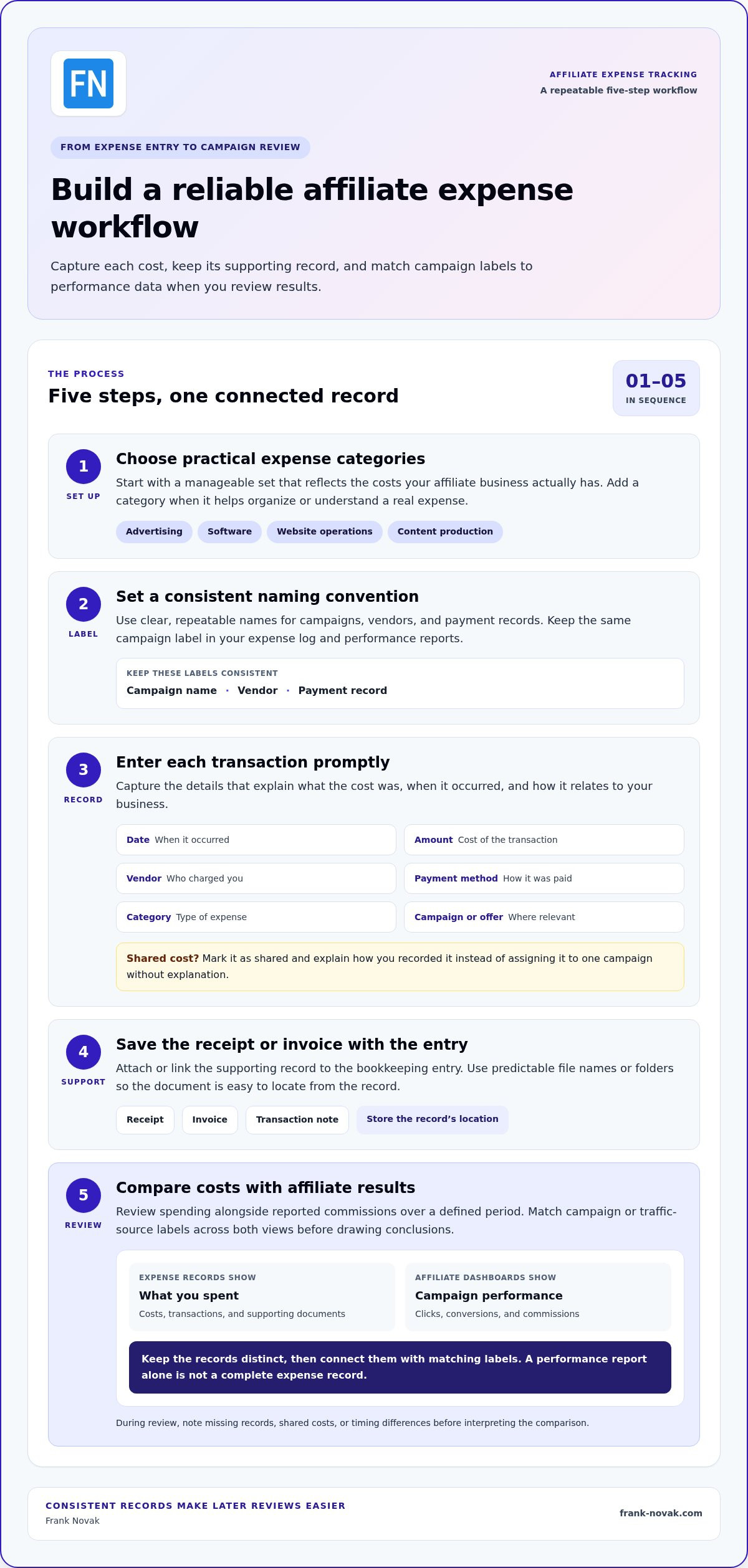
You don’t need complicated software to get started. Capture each cost consistently, keep its supporting record, and choose campaign labels that you can match to performance data later. Begin with a simple workflow and adjust it as your activity grows.
- Choose practical categories. Use a manageable set that reflects your actual spending, such as advertising, software, website operations, and content production. Add a category when it helps you understand or organize a real cost.
- Set a naming convention. Choose clear, repeatable names for campaigns, vendors, and payment records. Use the same campaign label in your expense log and performance reports rather than switching between abbreviations and informal descriptions.
- Record each transaction promptly. Enter the date, amount, vendor, payment method, category, and campaign or offer where relevant. If a cost supports several campaigns, mark it as shared and explain how you’ve recorded it.
- Save the supporting record. Attach or link the receipt, invoice, or transaction note to the bookkeeping entry. Use predictable file names or folders so you can locate the document from the record instead of searching through unrelated downloads.
- Review costs alongside results. Compare spending with reported commissions over a defined period, using matching campaign or traffic-source labels. Note missing records, shared costs, or timing differences before drawing conclusions.
Set up categories and capture records consistently
Consistency matters more than a long list of categories. If a vendor charge covers an email platform, record it under the same software category each time. If the service supports a particular campaign, add the campaign label in a separate field. Keep notes brief but useful: state what the purchase was for and where its receipt is stored. A repeatable format makes later reviews easier.
Connect expenses to affiliate campaign results
Traffic-source labels make campaign comparisons more useful. Identify whether a cost relates to search, paid advertising, email, or another source, and use labels that match how you plan and assess your affiliate traffic strategy. Avoid combining source, campaign, and offer into one vague label. Separate fields make it easier to filter records and see which costs belong together.
Compare like with like over a defined period, such as one campaign during a selected reporting window. Spending, attributed conversions, and commission reports may not appear at the same time. Your expense total may be available before all related commissions are reported, so mark the comparison as provisional when needed and revisit it when the reporting period is complete.
A practical weekly review: Set aside a regular time to enter new transactions, attach missing receipts, check campaign labels, and compare recent spending with the latest available commission reports.
If you’re refining how you plan and track campaigns, practical affiliate marketing guidance can help you build a more deliberate, sustainable process.
Compare Tools for Tracking Affiliate Marketing Expenses by Use Case
The right setup depends on what you need to record. A spreadsheet can capture costs, bookkeeping software can organize financial records, a receipt app can help keep supporting documents together, and an affiliate dashboard can report campaign activity. These tools may complement one another, but they don’t all answer the same questions. The examples below show where each type fits, not a universal ranking.
| Tool type and example | Ideal user | Expense-recording strengths | Affiliate-performance role | Main limitation |
|---|---|---|---|---|
| Spreadsheet, such as Google Sheets | Marketers with a small, straightforward set of transactions | Flexible columns for categories, campaigns, vendors, and notes | Can be used to compare manually entered expense and commission data | Manual entry and receipt filing require ongoing attention |
| Bookkeeping software, such as QuickBooks or Xero | Marketers who want a structured place for financial records | Organizes categorized spending and related bookkeeping information | Usually needs to be paired with affiliate performance reports | Setup and workflow may be more than a low-volume business needs |
| Receipt or expense app | Marketers who want a dedicated way to collect expense records | Helps keep receipts and transaction details organized | Doesn’t replace an affiliate dashboard for campaign activity | May need to work alongside a separate bookkeeping system |
| Affiliate dashboard, such as Trackdesk | Marketers using an affiliate tracking platform | Can provide context for campaign activity, but isn’t a substitute for complete expense records | Reports affiliate performance, such as clicks, conversions, and commissions | Performance reporting alone won’t organize all business costs and receipts |
When is a spreadsheet enough for affiliate expenses?
A spreadsheet can be a sensible starting point when you have a manageable number of transactions, clear categories, and time to keep records current. Its flexibility is useful, but you’re responsible for entering each expense, filing its receipt, and checking formulas and labels for mistakes. Consider a more structured bookkeeping workflow if you regularly miss entries, struggle to find receipts, or spend too much time cleaning up campaign comparisons.
When should you combine bookkeeping and affiliate tracking tools?
Use bookkeeping software as the home for categorized spending and financial records, then use an affiliate dashboard for clicks, conversions, and commission data. Matching campaign labels across both can help you compare costs with results without treating a performance report as a ledger. If you pay to reach an audience, keep the ad charge separate from the performance data used to assess it. This Facebook advertising guidance can help frame that distinction.
Before choosing a named tool, review its current documentation for features, compatibility, and export options. If you’re building a more deliberate affiliate business, practical affiliate marketing guidance can complement your recordkeeping process. This section is educational and isn’t personalized financial advice.
How to Choose an Expense Tracking Tool for Your Affiliate Business
The right setup fits your workload and is easy enough to maintain. Before comparing features, consider how many transactions you handle, how many campaigns you run, and whether you already have a bookkeeping routine. If your activity is straightforward and you’re comfortable entering costs manually, a spreadsheet may be enough. If missed entries or hard-to-find receipts have become routine, a more structured tool may make the process easier.
Evaluate options using their current vendor documentation. Look for features that support your actual workflow:
- Categories and labels: Can you classify costs and distinguish campaigns, offers, or traffic sources?
- Receipt capture: Can you attach or associate receipts and notes with the relevant records?
- Exports and integrations: Can you retrieve your data in a useful format or connect it with the other tools you rely on?
- Access controls: Can you manage who can view or edit financial records if you work with others?
- Reporting: Can you review expenses in ways that help with bookkeeping and campaign analysis?
Don’t assume a feature exists just because it’s common in similar software. Check each vendor’s current documentation for compatibility, export options, and how its features work. Tools for tracking affiliate marketing expenses should make necessary recordkeeping easier, not add a complicated system you won’t maintain.
Which features matter most for a beginner?
Start with clear entry fields, consistent categories, accessible receipts, and useful exports. Those basics help you maintain reliable records. Advanced affiliate-program features, such as managing partners or commission structures, may not be relevant if your main need is tracking your own business costs. Choose a workflow you can continue using as campaigns change, rather than one that only suits your current setup.
How can you evaluate a tool without overcomplicating your setup?
Test a small sample of real transactions before moving all your records. Include different expense categories, a receipt, and costs tied to separate campaigns. Check whether you can find entries later, update a label, review a useful report, export the records, and make a backup. This trial can show whether the system fits your habits before you commit to migrating everything.
Keep the tool’s purpose in view. A dashboard with click or commission analytics can help explain campaign performance, but those features alone don’t make it a complete expense-recording system. Match cost records with performance data when reviewing campaigns, and remember that organized records support decisions; they don’t guarantee profit or determine tax treatment. For tax questions, consult a qualified professional. I’m not providing personalized financial advice.
Put Your Affiliate Expense Tracking System Into Practice
A useful system is one you can maintain as your campaigns and costs change. Start with a manageable set of categories, choose a tool that fits your recordkeeping habits, and set a review schedule you can stick to. You don’t need a perfect dashboard on day one. Build a dependable record that helps you make thoughtful decisions.
Start with a small, repeatable tracking setup
Begin with categories for costs you actually have, such as advertising, software, website operations, and content production. Choose a simple tool, then apply the same category and campaign labels each time you enter a record. Once the workflow feels familiar, add a category only if it clarifies a real difference in spending.
- Choose your categories and labels. Keep the list short enough to use consistently, with campaign names that will be easy to recognize later.
- Select your tracking tool. Use a spreadsheet or bookkeeping tool that suits your transaction volume and makes it practical to retain supporting records.
- Enter existing expenses carefully. Use statements, receipts, and invoices to record what you can verify. If an amount or campaign detail is missing, mark it as unknown and look for the source rather than guessing.
- Set a regular review time. Choose a cadence that matches how often costs come in and how frequently you need to assess campaign activity. There’s no single schedule that fits every affiliate business.
After using the setup for a while, check whether you can find records, understand what each expense relates to, and compare campaign spending without excessive cleanup. If the process is difficult to maintain, simplify the categories or adjust the tool before adding complexity. Even the best tools for tracking affiliate marketing expenses only help when your records stay consistent.
Use expense records to make informed next-step decisions
Once your records are organized, compare campaign spending with reported commissions over a clearly defined period. Keep reporting delays in mind: a cost may appear before all related conversions are attributed or commissions are reported. Treat early comparisons as provisional when results are incomplete, then revisit them as more data becomes available.
Look for patterns that can guide a measured next test, such as a campaign with rising costs or a traffic source worth examining more closely. A pattern is a reason to investigate, not a promise of future profit. Your records can help you decide what to test, pause, or review, but they can’t guarantee a particular return or determine how an expense will be treated for tax purposes.
This article is educational, and I’m not giving personalized financial advice.
Make Your Next Tracking Decision a Practical One
Your first setup doesn’t have to be your forever system. Choose tools for tracking affiliate marketing expenses that you can maintain now, then adjust as your campaigns and recordkeeping needs develop. A small, dependable routine can give you a clearer basis for deciding what to test next, without assuming that any tool or campaign will guarantee a particular result.
Frank Novak shares practical affiliate marketing guides and tutorials focused on transparent disclosures and sustainable business growth. For support building your affiliate business, explore Online Success Coaching and the ClickBank Super Funnel.
Steady, informed decisions add up. Keep learning, keep your records useful, and give your business room to grow at a pace that works for you.
Frequently Asked Questions
What is the difference between affiliate tracking software and expense tracking software?
Affiliate tracking software reports activity such as link clicks, conversions, and commissions. Expense tracking software records what you spend and organizes supporting documentation. For example, an affiliate dashboard might show commission activity for a link, while expense records show the cost of an ad or subscription used to promote it. Tools for tracking affiliate marketing expenses help answer cost questions, not just performance questions.
Can I track affiliate marketing expenses in a spreadsheet?
Yes. A spreadsheet can work if you have a manageable number of transactions and can maintain it consistently. You might use separate tabs for expenses and campaign summaries, with filters to find entries by vendor or campaign. Check formulas when you update the sheet, and organize receipt files so you can match each expense to its supporting document. If manual upkeep becomes difficult, consider a more structured workflow.
Which expenses should affiliate marketers track?
Track business costs relevant to your activity, such as advertising, software, website operations, and content production. Depending on your work, you may also want to record professional services or business-related travel. Note the business purpose for each transaction, especially if a cost is shared across activities. Recording an expense doesn’t automatically mean it qualifies for a tax deduction. This is general information, not personalized financial or tax advice.
Do I need affiliate tracking software to monitor marketing expenses?
No. You can record expenses with a spreadsheet or bookkeeping tool, without affiliate tracking software. An affiliate dashboard is useful when you need reports on clicks, conversions, or commissions from your links or program. If you don’t need those performance reports, you may not need a dedicated affiliate tracker. Keep expense records in a system that lets you review transactions and find their supporting documents.
How do I compare affiliate campaign costs with commissions?
Choose a reporting period and match costs to the campaign that generated them, then compare the total with commissions reported for that campaign and period. Keep pending or delayed commission data separate from confirmed amounts so an incomplete report doesn’t distort your view. If several campaigns share a cost, document how you’ve treated it. Use the comparison to guide questions and tests, not as a guarantee of future results.
Is a free tool enough to track affiliate marketing expenses?
It can be, if it lets you record the details you need, retain or link supporting documents, and retrieve your data for review. The key test is whether you can keep it current without losing track of receipts or making repeated corrections. Before relying on any tool, check how to export and back up your records. If your needs grow, you can move to a more structured option.
Should I use one tool for affiliate expenses, clicks, and commissions?
Not necessarily. A single platform may be convenient if it handles the expense records and performance details you need, but don’t choose it based on click or commission analytics alone. Check whether it can organize financial records, preserve supporting documents, and provide usable exports. Separate tools can work well too, provided you use consistent campaign labels and have a clear way to compare their information.

Article by
Frank Novak
Frank Novak is an online marketing professional and coach who focuses on affiliate marketing and business automation. Through his website, frank-novak.com, he shares insights and strategies for leveraging social media platforms like Facebook to generate traffic and commissions.
Affiliate / Sponsored Content Disclaimer
This [website/post] contains affiliate links. If you click through and make a purchase, we may receive a commission at no additional cost to you. We only recommend products or services we believe will add value to our readers.