

Relying on broad interest targeting or hoping third-party vendor pages will magically feed your ad account is the fastest way to burn through your media budget. Learning how to use Facebook lookalike audiences for affiliate offers represents the true turning point toward sustainable scaling, yet it presents a major hurdle when you don’t own the final checkout page. If you feel exhausted by diminishing returns on cold traffic and dread the thought of sudden policy flags, you aren’t alone.
The good news is that you don’t need direct access to a merchant’s pixel to train Meta’s algorithm effectively. In this guide, you’ll discover how to build high-converting Lookalike Audiences for affiliate offers without triggering ad account bans or wasting ad spend. We will walk through establishing compliant bridge funnels, capturing pristine first-party seed data, and methodically scaling 1% to 5% lookalike ad sets for reliable profit.
Key Takeaways
- Master the fundamentals of how to use Facebook lookalike audiences for affiliate offers by turning intermediate bridge funnels into reliable data collection engines.
- Capture high-intent, first-party seed data through pre-lander micro-conversions and opt-in mechanisms without ever needing access to vendor checkout pixels.
- Configure optimal seed brackets between 1% and 5% in Meta Ads Manager to balance audience affinity with adequate delivery volume.
- Scale winning campaigns methodically by pairing targeted creative angles with Advantage+ audience suggestions to prevent disruptive learning phase resets.
- Protect your Meta ad account from sudden policy restrictions by implementing transparent affiliate disclaimers, clear privacy policies, and verified intermediate domains.
Understanding Facebook Lookalike Audiences in the Affiliate Marketing Ecosystem
Scaling paid traffic without an algorithmic advantage quickly turns into an expensive guessing game. In performance marketing, lookalike audiences serve as Meta’s automated matchmaking engine, finding new users whose online behaviors mirror your best customers. While cold interest targeting requires you to guess hobbies and demographic combinations, lookalikes allow Meta’s machine learning models to analyze thousands of data points simultaneously to locate high-converting prospects.
The true difficulty for performance publishers lies in account architecture. Because you don’t own the final vendor checkout, capturing clean conversion signals requires a deliberate approach. Understanding how to use Facebook lookalike audiences for affiliate offers requires bridging the gap between external sales pages and your own ad account.
To better understand this concept, watch this helpful video walkthrough on setting up source audiences correctly:
The Mechanics of Algorithmic Audience Expansion
Meta creates lookalike cohorts by examining shared behaviors rather than surface-level geographic or age data. When you supply a high-quality seed list, the algorithm looks at intent signals: browsing patterns, content engagement, ad interaction history, and transactional frequency. It then weighs these signals across the active user base to rank prospects by statistical affinity.
This process means a focused seed pool of qualified buyers produces vastly better targeting than a massive, unsegmented list of casual visitors. Quality always trumps volume.
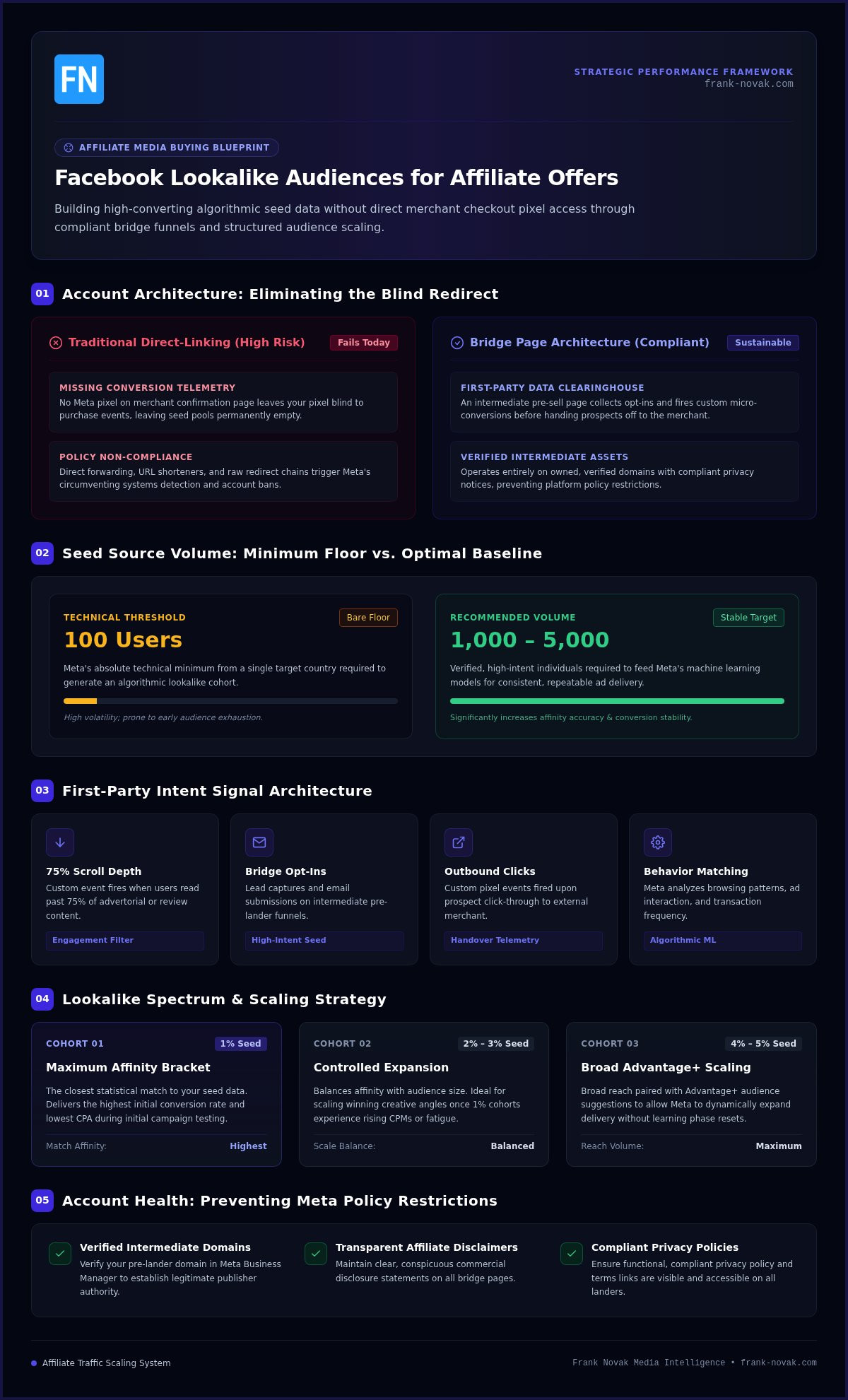
Why Traditional Direct-Linking Fails with Modern Lookalikes
Years ago, media buyers routinely sent traffic straight to third-party merchant pages. Today, attempting this approach creates two fatal roadblocks:
- Missing conversion telemetry: If you cannot install your Meta pixel on the merchant’s confirmation page, your pixel never records the actual purchase event. Without that feedback loop, your seed data remains empty.
- Policy non-compliance: Direct affiliate link forwarding, URL shorteners, and raw redirect chains trigger Meta’s circumventing systems detection, which leads directly to disabled ad accounts.
Mastering how to use Facebook lookalike audiences for affiliate offers means eliminating blind redirects. Successful campaigns rely on dedicated bridge assets, such as those implemented through the ClickBank Super Funnel, to capture compliant first-party events before handing the prospect off to the merchant.
Preparing High-Quality Seed Audiences Without Direct Affiliate Pixel Access
Most performance marketers struggle because major affiliate networks do not let affiliates place tracking scripts on final order confirmation pages. Without those purchase events, your pixel remains completely blind to who actually buys. Discovering how to use Facebook lookalike audiences for affiliate offers under these conditions requires shifting from third-party conversion dependency to owned first-party data collection.
To construct an accurate Lookalike Audience, Meta requires a seed source containing at least 100 people from a single target country. While 100 represents the bare technical floor, feeding the system 1,000 to 5,000 verified, high-intent individuals produces far more stable targeting. Achieving that volume without access to vendor order pages requires capturing behavioral indicators on web properties that you control directly.
Building First-Party Seed Data with Bridge Pages
Instead of sending cold traffic directly to an external sales letter, position an intermediate pre-sell page in between. This pre-lander acts as your personal data clearinghouse. Here, you capture opt-ins or fire custom micro-conversion events directly into your dataset.
You can configure granular custom events on your bridge page to segment user intent:
- Scroll depth thresholds: Fire custom events when visitors scroll past 75% of your advertorial or review content.
- Dwell time triggers: Log an event when a user actively reads your page for more than 60 seconds.
- Outbound merchant clicks: Track every prospective buyer who clicks your outbound affiliate link with a custom “InitiateCheckout” or “PreSellClick” tag.
Deploying a turnkey system like the ClickBank Super Funnel creates a compliant data layer automatically. It lets you capture email subscribers and track micro-actions before forwarding prospects, ensuring every visitor builds your proprietary asset base.
Customer List Uploads and Lead Quality Filtering
When you gather subscriber emails, uploading those contacts directly into Meta Ads Manager gives you an exceptionally potent seed. However, uploading raw, unfiltered lists can hurt your ad performance. If your list includes unverified submissions, tire-kickers, or casual clickers, Meta’s algorithm optimizes for users who sign up for freebies rather than those who make purchases.
Filter your customer list before exporting your CSV. Include subscribers who clicked links inside your follow-up email sequences, completed a multi-step survey, or demonstrated persistent engagement. Ensure your landing page adheres to the FTC Endorsement Guides by displaying clear affiliate relationship notices, which keeps your opt-in forms fully compliant.
If you want seasoned guidance on building these high-intent data assets correctly from day one, exploring Frank Novak’s online success coaching can help streamline your entire tracking workflow.
Step-by-Step Configuration: Setting Up Lookalike Audiences in Meta Ads Manager
Once you gather clean seed data from your bridge assets, setting up your targeting inside Meta Ads Manager requires a systematic sequence. Navigating how to use Facebook lookalike audiences for affiliate offers successfully comes down to establishing precise audience segments and preventing self-competition between your ad sets.
Before launching your targeting, ensure your campaign does not fall under Special Ad Categories like credit, housing, or employment. Meta prohibits lookalike generation for those verticals entirely. For standard consumer offers, building your cohorts takes just a few structured steps.
Selecting Sources and Defining Geographic Parameters
Open your Ads Manager menu, head into the Audiences dashboard, and click Create Audience followed by Lookalike Audience. Select your custom audience as the source. This can be your pre-lander engagement dataset or an uploaded CSV of verified leads.
Next, define your target geographic region. Always select countries where your affiliate network permits traffic and pays out full commissions. If your bridge page uses English copy tailored for North America, confine your initial audience to that specific country rather than bundling multiple regions into a single lookalike.
Structuring Audience Percentages for Precision and Scale
Meta configures lookalikes on a 1% to 10% scale based on the total addressable population of your target country. In the United States, a 1% lookalike represents roughly 2.3 to 2.4 million people who match your seed data most closely. Expanding beyond that percentage broadens your pool while slightly diluting behavioral affinity.
To launch and scale methodically, structure your audience tiers using this proven testing framework:
- The 1% Tier (High Intent): Deploy this tier first. It captures the densest cluster of matching purchase and engagement signals.
- The 2% to 3% Tier (Scale Phase): Introduce this wider tier once your 1% ad sets demonstrate positive return on ad spend.
- The 3% to 5% Tier (Broad Scale): Use this bracket when you have established winning ad creative and need higher delivery volume.
To avoid competing against your own ads, always use negative targeting. When running a 2% to 3% lookalike, exclude the 1% and 2% groups alongside your original seed list. This step ensures clean ad delivery and prevents bidding against yourself. In addition, keep your advertorials aligned with the FTC Endorsement Guides so your incoming traffic meets Meta’s advertising standards consistently.
Campaign Testing, Ad Creative Matching, and Scaling Strategies
Executing a successful campaign requires evaluating whether automated systems outperform isolated manual targeting. When mastering how to use Facebook lookalike audiences for affiliate offers, your testing framework must distinguish between pure audience efficiency and broader algorithmic expansion. Meta’s Advantage+ audience features dynamically expand targeting beyond your specified lookalike percentage whenever the system predicts cheaper conversions, while manual ad sets preserve strict audience boundaries.
Both methods offer distinct advantages. Manual cohorts protect smaller budgets from expanding into unqualified impressions. Conversely, feeding a vetted seed into Advantage+ as an audience suggestion can reduce customer acquisition costs once an offer demonstrates proven market resonance. Integrating these approaches with core principles on how to drive traffic to affiliate links keeps your media spend focused on verified buyer intent.
A/B Testing Framework: 1% Lookalikes Versus Interest Stacks
To accurately gauge performance, isolate your variables. Launch one Campaign Budget Optimization (CBO) or Ad Set Budget campaign containing three distinct ad sets: a 1% Lookalike ad set, a clustered interest-targeting ad set, and a broad demographic ad set acting as a control. Allocate identical creative assets across all three buckets.
Remember that Meta ad sets require approximately 50 optimization events within a rolling 7-day window to exit the learning phase. If your daily budget cannot support 50 bridge-page opt-ins or outbound pre-sell clicks weekly, consolidate your ad sets to concentrate delivery. Track your cost per lead, click-through rates, and earnings per click closely during this calibration period.
Creative Congruence from Ad to Affiliate Checkout
High bounce rates often trace back to creative dissonance rather than poor audience selection. Lookalike audiences represent cold traffic that shares demographic traits with previous buyers, but these users have never seen your brand. Cold prospects demand clear messaging that connects your ad copy seamlessly with your pre-lander headline.
Maintain message match across every touchpoint:
- Headline parity: Mirror the core pain point or angle from your Facebook ad directly on your bridge page header.
- Tone alignment: Avoid aggressive earnings claims or sensational promises that trigger ad rejection and create friction when prospects land on the merchant page.
- Editorial bridge layout: Structure your bridge page as an educational review, comparison, or problem-solving story to warm prospects up before presenting the affiliate solution.
When you spot a winning 1% lookalike ad set, scale your budget methodically. Keep daily budget increases under 20% to avoid resetting the algorithm’s learning phase into calibration mode.
Preventing Ad Account Bans and Maintaining Compliance While Scaling
Generating profitable ad sets means little if an automated compliance sweep disables your business manager overnight. With Meta having removed over 150 million violating ads under its Circumventing Systems and Unacceptable Business Practices policies, maintaining operational hygiene is essential. Truly mastering how to use Facebook lookalike audiences for affiliate offers means building an advertising infrastructure designed for longevity rather than fleeting wins.
Most account penalties stem from intermediate page shortcuts. Affiliates often attempt to bypass policy reviews using disguised redirects, sensational headlines, or stripped-down bridge pages that lack basic transparency. Meta treats these shortcuts as deceptive practices, resulting in swift, permanent asset bans.
Essential Compliance Elements for Affiliate Bridge Pages
Automated scrapers evaluate your destination URL seconds after an ad is published. To ensure your bridge pages clear inspection, make sure they feature the necessary legal and structural components:
- Affiliate disclosures: Display a prominent disclosure above the fold or directly beneath call-to-action buttons stating clearly that you earn a commission if readers make a purchase.
- Footer links: Include accessible, working links to your Privacy Policy, Terms of Service, and a functional Contact Us page featuring a monitored email address.
- Grounded claims: Remove exaggerated income claims, artificial countdown timers, and before-and-after imagery that violate Meta advertising standards.
Building Resilient Digital Marketing Assets
Longevity requires establishing strong account equity. Start by verifying your bridge page domain inside Meta Business Settings. Deploying server-side tracking via the Conversions API (CAPI) on that domain provides clean attribution while bypassing browser-based signal loss, giving your lookalikes better baseline data.
When launching new ad accounts, warm them up gradually. Run small engagement or traffic campaigns for several days before publishing aggressive conversion ad sets. If you run into recurring compliance flags or feel unsure about structuring your sales funnels, working directly with Frank Novak can provide the seasoned mentorship needed to scale safely.
By treating your pre-landers as legitimate publishing assets rather than temporary speed bumps, you create a defensible framework. This lets you scale lookalike ad sets profitably without fearing routine policy checks.
Transforming Algorithmic Audiences into Predictable Affiliate Growth
Shifting from volatile cold interest targeting to algorithmic scaling begins with owning your traffic path. By routing visitors through compliant bridge assets, you capture pristine first-party signals that replace missing vendor checkout data. Methodically deploying 1% to 5% cohorts then allows you to expand your reach while keeping acquisition costs under control.
Mastering how to use Facebook lookalike audiences for affiliate offers isn’t about trying to outsmart Meta’s algorithm. It’s about feeding the system verified intent signals, matching creative hooks from ad to bridge page, and protecting your ad accounts with transparent disclaimers. When you combine structured digital marketing automation with proven funnel frameworks, scaling affiliate offers becomes an orderly, predictable process.
You now have the blueprint to run high-performing campaigns safely. Take it one step at a time, let the data guide your budget decisions, and build your digital assets for sustainable, long-term success.
Frequently Asked Questions
Can I build a Facebook Lookalike Audience without owning the affiliate checkout page?
Yes, you can build powerful lookalikes by capturing first-party signals on an intermediate bridge page. Because you cannot place your pixel on a vendor’s checkout, you track proxy events like pre-lander form submissions, 60-second dwell time, or outbound affiliate clicks. Learning how to use Facebook lookalike audiences for affiliate offers this way lets you model prospects based on real engagement data rather than relying on third-party access.
What is the minimum seed audience size needed for an effective affiliate Lookalike?
Meta enforces a strict technical minimum of 100 people from a single country to generate a Lookalike Audience. While the system can build a cohort from 100 users, that small sample often leads to unstable delivery. For reliable performance and accurate pattern matching, aim for a seed list of 1,000 to 5,000 verified leads or bridge-page micro-converters before deploying your ad budget.
Which percentage Lookalike should beginners test first on Meta Ads Manager?
Beginners should always start with a 1% Lookalike Audience. In the United States, a 1% bracket contains roughly 2.3 to 2.4 million users who share the highest behavioral affinity with your source seed. Once this tight cohort demonstrates consistent profitability and exits the calibration phase, you can expand methodically into 2% and 3% segments to scale ad delivery safely without diluting performance.
Why does Meta reject Facebook ads that point to direct affiliate links?
Meta rejects direct affiliate links because they violate policies regarding Circumventing Systems and Destination Requirements. Forwarding users through raw affiliate redirects or URL shorteners conceals the ultimate landing page destination from automated compliance scrapers. Direct links also create poor user experiences and frequent message mismatches, both of which trigger automated ad account restrictions and immediate campaign disapprovals.
How do I prevent my Lookalike audiences from overlapping and bidding against each other?
You prevent audience overlap by applying strict negative exclusions inside each ad set. If you run a campaign testing 1%, 2%, and 3% tiers simultaneously, exclude the 1% audience from the 2% ad set. Then, exclude both the 1% and 2% tiers from the 3% ad set. This ensures your ad sets target mutually exclusive user pools and never compete against each other in the ad auction.
What event should I optimize for when running Lookalike campaigns to a bridge page?
You should optimize for a custom conversion or standard event fired directly on your bridge page, such as Lead or ViewContent. Understanding how to use Facebook lookalike audiences for affiliate offers requires generating at least 50 optimization events per ad set every 7 days. If your offer budget cannot support 50 email opt-ins weekly, optimize for high-intent outbound clicks directed toward the merchant.
How often should I update or refresh my Lookalike seed audience lists?
Dynamic Lookalike Audiences built from your Meta Pixel or Conversions API update automatically every 3 to 7 days as new visitors trigger events. If you use static CSV customer files or manual email exports, you should manually refresh those lists every 30 to 60 days. Regular updates ensure the algorithm trains on recent buying trends and avoids target fatigue across your active campaigns.

Article by
Frank Novak
Frank Novak is an online marketing professional and coach who focuses on affiliate marketing and business automation. Through his website, frank-novak.com, he shares insights and strategies for leveraging social media platforms like Facebook to generate traffic and commissions.
Affiliate / Sponsored Content Disclaimer
This [website/post] contains affiliate links. If you click through and make a purchase, we may receive a commission at no additional cost to you. We only recommend products or services we believe will add value to our readers.