

What if you could stop copying lead and campaign details between apps without giving up control of your affiliate workflow? Learning how to use Zapier for affiliate marketing automation can help you connect repeatable steps, but a useful setup still needs clear rules for attribution, disclosures, and data handling.
If you’re unsure which app should start a workflow or what should happen next, you’re not alone. A Zap links a trigger, such as a new lead, to one or more actions, such as updating a spreadsheet or sending a notification. In this guide, you’ll learn how to plan, build, and test an affiliate workflow, add safeguards against routing errors, and decide which tasks to automate and which decisions to review yourself.
The goal isn’t to automate every part of affiliate marketing. It’s to make routine handoffs easier while keeping your links accurate and your audience’s trust in view. I earn a commission if you apply through my link, but this doesn’t cost you anything extra. I’m not giving personalized financial advice.
Key Takeaways
- Use how to use Zapier for affiliate marketing automation as a practical starting point: pick one recurring admin task and define what a successful workflow should do.
- Before building, confirm that your chosen apps support the trigger and actions your workflow needs.
- Automate routine record-keeping and notifications, but review decisions that affect audience trust, attribution, or promotional judgment.
- Check workflows periodically for failed runs, duplicate records, outdated connections, and changed permissions.
- Keep affiliate disclosures clear and review them in the published content yourself.
Why use Zapier for affiliate marketing, and what should you automate first?
Affiliate marketing involves promoting a company’s offer and earning a commission when a referral meets the program’s terms. A publisher’s recurring work may include organizing content ideas, keeping lead details in order, and recording which campaigns are active. The overview of What is Affiliate Marketing? explains the basic model and its key participants. One distinction matters: a publisher’s workflow differs from a brand’s affiliate-program operations. Recruiting partners, onboarding them, and administering commissions are brand-side tasks, not the starting point for a publisher promoting offers.
A Zap is a workflow that starts with a trigger and then performs one or more actions. For example, a new entry in an idea form could prompt Zapier to create a record in a content tracker. That connection can reduce repetitive copying, but you still decide what to publish, which offer fits, and how to serve your audience. Learning how to use Zapier for affiliate marketing automation starts with that boundary: automate the handoff, not the judgment.
Which affiliate marketing tasks are suitable for automation?
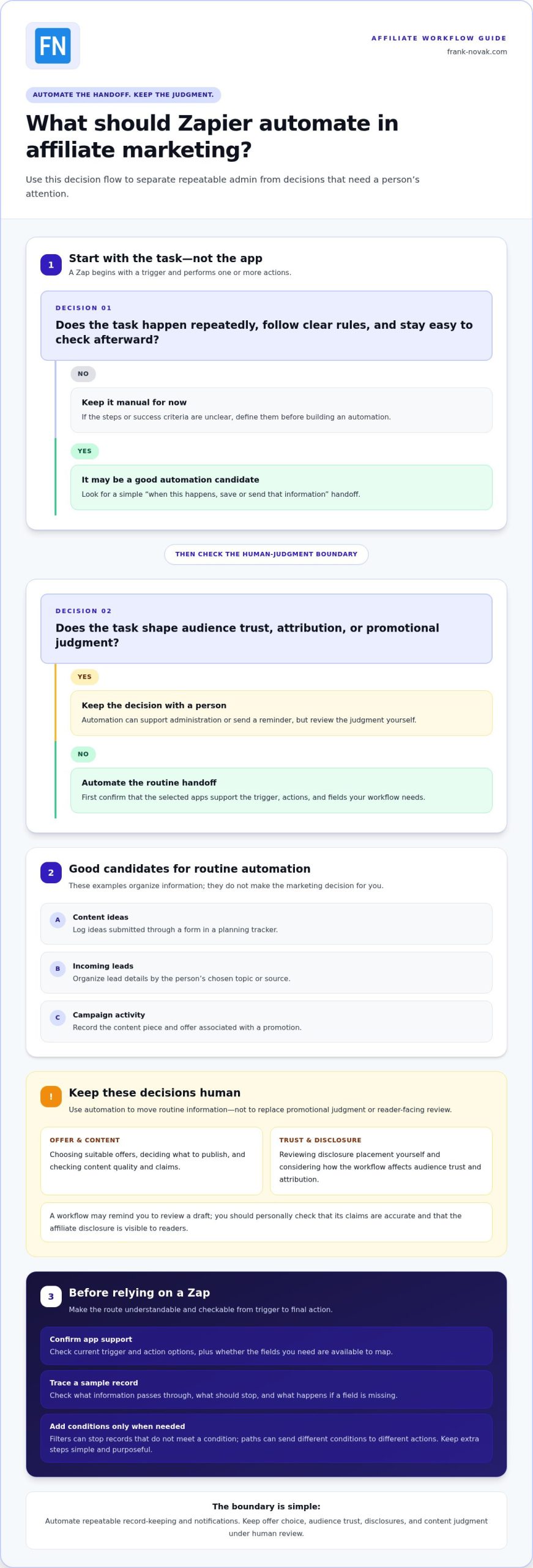
Start with work that happens repeatedly, follows clear rules, and is easy to check afterward. If you can describe the task as “when this happens, save or send that information,” it may be a sensible automation candidate.
- Log content ideas submitted through a form in a planning tracker.
- Organize incoming leads by their chosen topic or source.
- Record campaign activity, such as the content piece and offer associated with a promotion.
Keep records useful and limited to the information you need. Automation can help keep routine details together, but it can’t create traffic, conversions, or commissions by itself.
What Zapier can and cannot do in an affiliate workflow
Zapier connects supported apps so information or actions can pass between them. It isn’t an affiliate network, doesn’t choose suitable offers, and doesn’t replace a marketing plan. App availability and supported triggers or actions can change, so review the current options before building around a particular connection.
Use automation for administration, then review the parts that shape your relationship with readers. Offer selection, audience trust, disclosure placement, and content quality need human oversight. For instance, a workflow may remind you to review a draft, but you should personally check that its claims are accurate and that an affiliate disclosure appears where readers can see it. I earn a commission if you apply through my link, but this doesn’t cost you anything extra. I’m not giving personalized financial advice.
How Zapier workflows work: triggers, actions, filters, and paths
A Zap moves information through a sequence: an event starts the workflow, and the next steps determine what happens to the relevant data. A trigger detects an event, then actions use its data to complete routine tasks in connected apps. Filters and paths add conditions, allowing a workflow to stop or take different routes when records meet specific criteria.
Knowing these building blocks makes it easier to plan how to use Zapier for affiliate marketing automation without treating every connection as a black box. The Performance Marketing Association shares industry resources and perspectives through its Performance Marketing Industry Standards resources. Your Zap’s job is narrower: carry out the workflow you define.
Triggers and actions in a simple affiliate workflow
Imagine a reader submits an opt-in form to receive a resource. The form response is the trigger. A first action could create a lead record in a spreadsheet or contact-management app, using fields such as name, email, and the form or campaign source. A later action could create a follow-up task or send you a notification to review the lead.
This is an illustrative workflow, not a guarantee that a particular app supports those exact events. Before building, check the trigger and action options for each selected app, then confirm that the fields you need are available to map between them.
When to use filters, paths, and formatting
Use a filter when only records meeting a clear condition should continue. For example, you might let a workflow proceed only when a form response includes a selected topic. Use paths when different conditions should lead to different actions, such as organizing leads into separate review queues based on that topic. Check that the features you need are available for your plan and selected apps.
Formatting is useful when connected apps expect information in different structures, such as a date or text value that needs a consistent format. Keep the transformation simple, and test the result before relying on it. Extra steps can make a Zap harder to understand, so add them only when they solve a specific handoff problem.
Before switching on a workflow, trace a sample record from trigger to final action. Ask what information should pass through, what should stop, and what should happen if a field is missing. These checks put the principles of how to use Zapier for affiliate marketing automation into practice, helping you spot misrouted data early and decide where a person should review the result.
If you’re building your broader affiliate process alongside these workflows, Frank Novak’s affiliate marketing guidance offers practical ideas to explore.
Which affiliate marketing tasks should Zapier automate, and which should stay manual?
A useful rule is to automate repeatable administration, then keep decisions that affect your recommendations and earnings under human review. Zapier may help record information or move it between compatible apps, but connecting those apps doesn’t prove that a referral was tracked correctly or that a sale will receive affiliate credit.
Start with tasks where the instruction is clear and the result is easy to check. For instance, if your form app and tracking sheet support the needed events, you could save a lead’s chosen topic and campaign source in a consistent format. You might also create an internal follow-up task when a new response arrives. These examples depend on app support and must follow the affiliate program’s rules.
Good candidates: lead organization and campaign administration
Routine record-keeping is often a sensible place to begin. Use consistent campaign names across your planning notes and records, such as a stable format for the content topic, channel, and campaign period. Clear labels make it easier to compare records and investigate an error later. Keep the naming system simple, and don’t treat an automated record as proof of a click, sale, or commission.
| Task | Automation opportunity | Human review | Main risk |
|---|---|---|---|
| Form leads | Record selected fields in a compatible app | Check field mapping and access | Missing or misrouted data |
| Campaign records | Save activity using a consistent label | Review naming and source details | Confusing or incomplete records |
| Follow-up tasks | Create an internal reminder after a defined event | Confirm the task is relevant before acting | Duplicate or unnecessary reminders |
| Offer promotion | Organize related administrative details | Assess fit, claims, and disclosure | Unsuitable or misleading promotion |
Keep offer decisions, disclosures, and attribution under review
Before publishing, decide whether an offer fits your audience, check that the content represents it accurately, and review where the disclosure appears. If you use an affiliate link, include a clear statement such as: “I earn a commission if you apply through my link, but this doesn’t cost you anything extra.” A workflow can remind you to review a draft, but it can’t judge whether the recommendation is trustworthy or the disclosure is clear in context.
Affiliate link creation, redirects, and attribution depend on the affiliate network and the apps involved. A Zap may pass a link or campaign value between connected systems, but it can’t establish by itself whether a click or sale will receive commission credit. Review the program’s tracking process and reporting separately. Treat automation as administrative support, not as a guarantee of accurate attribution or earnings.
How to build and test your first Zapier affiliate marketing workflow
A reliable first Zap is narrow enough to explain in one sentence. Before opening Zapier, write down what starts the workflow, what should happen next, and how you’ll know it worked. For example: “When someone submits my campaign inquiry form, create a review record with the campaign name and submission date.” A clear success condition might be that the record appears once, with each value in the correct field.
Plan the workflow before opening Zapier
Map the information’s route from its source to its destination, including who should review the result. Choose compatible apps based on the fields and events you need, then verify their current trigger and action options in Zapier. App connections and supported events can change, so don’t build a process around an assumed feature.
Keep the first version focused. Decide which fields are necessary for the task, such as a campaign label or form response, and avoid sending unrelated information to other apps. If a step doesn’t support the stated goal, leave it out. This makes it easier to identify where a problem occurred and reduces unnecessary data movement.
Test, switch on, and document the Zap
Build one step at a time. Use sample records first, and inspect how each field appears in the destination app rather than assuming a successful test means the data is mapped correctly. Then try different cases before relying on the workflow:
- Expected input: Check that a complete sample record reaches the correct destination and meets your success condition.
- Incomplete input: See what happens when an optional field is blank, and decide whether the Zap should continue or pause for review.
- Duplicate input: Submit the same sample information again to check whether it creates an unwanted duplicate.
- Unexpected input: Try an unfamiliar campaign label or format and confirm that it doesn’t get routed somewhere inappropriate.
Before turning the Zap on, review its action settings, filters, and destination account. Confirm that failure notifications or another review method will help you notice a step that didn’t complete. If the workflow has several actions, check how its task use fits your plan. Zapier’s Free plan is limited to two-step Zaps, so a longer workflow may require a paid plan.
Document the Zap’s purpose, owner, connected apps, expected result, and review process. Note what a normal record looks like and how to pause or inspect the workflow if something changes. That short reference makes future troubleshooting easier, especially if you return to the automation after a break.
This is a practical starting point for learning how to use Zapier for affiliate marketing automation: build a workflow you can explain, test, and monitor.
How to maintain and scale affiliate marketing automations responsibly
A Zap that works today still needs occasional attention. Apps change, permissions can expire, and a small adjustment to a form or destination can affect what information moves through a workflow. Set a review schedule that fits how often the Zap runs, and check whether its original purpose and safeguards still make sense.
Focus on operational health, not assumed business results. Useful measures include successful runs, failed tasks, processing errors, and duplicate records. These can show whether information is moving as intended, but they don’t demonstrate that links are attributed correctly or predict earnings. Keep a person involved in reviewing affiliate links, claims, disclosures, and messages to your audience.
- Review task history for errors or repeated failures.
- Look for duplicate or incomplete records in destination apps.
- Check connected accounts, permissions, and app changes that could affect a Zap.
- Confirm that human review points for links, content, and disclosures remain in place.
Troubleshoot common workflow problems
If a Zap stops behaving as expected, trace the workflow from the trigger onward. Confirm that the right event still starts it, check whether fields map to the intended destinations, and review app permissions or recent connection changes. Use Zapier’s task history and error messages to identify the failing step. After making a change, test it with sample records before returning the workflow to regular use.
Build a more connected affiliate system over time
Scale gradually. Add a workflow only when you can explain what it does, how you’ll monitor it, and who reviews exceptions. A Zap can support a broader funnel process, but it’s only one part of that system. Planning the reader journey and attracting visitors are separate tasks, and automation alone doesn’t do either one.
As you refine your funnel, the ClickBank Super Funnel is a separate funnel-building resource. Keep your chosen apps and workflow steps aligned with the affiliate program’s current rules, and personally review how links and campaign details are handled. This is how to use Zapier for affiliate marketing automation while keeping trust and oversight central.
For further ideas as you develop your process, explore Frank Novak’s affiliate marketing resources. I’m not giving personalized financial advice.
Make your next automation a thoughtful one
Your next step doesn’t need to be a complex system. Choose one point in your workflow where a dependable handoff would make your work easier, then give the automation a clear purpose and a review routine. As you learn how to use Zapier for affiliate marketing automation, keep asking whether each new connection supports a better experience for your audience, not just a busier dashboard.
When you’re ready to develop the wider business behind your workflows, Frank Novak’s practical affiliate marketing and business automation guidance can help you consider what to work on next. Online Success Coaching and the ClickBank Super Funnel are resources for building your affiliate business and funnel, not Zapier integrations.
I’m not giving personalized financial advice.
Build steadily, keep your audience’s trust at the center, and let each well-tested improvement give you a clearer path forward.
Frequently Asked Questions
What is Zapier used for in affiliate marketing?
Zapier can pass information between compatible apps to support routine affiliate marketing administration. For example, when you mark a draft as published in a content tracker, a workflow might record its campaign label in another connected app, if the required events are supported. It won’t choose an offer or assess a promotion for you. Understanding how to use Zapier for affiliate marketing automation means treating it as workflow support, not a substitute for marketing judgment.
Can Zapier create or manage affiliate links automatically?
Sometimes a connected app may support an action related to creating or storing links, but don’t assume Zapier can generate a valid affiliate link for every program. Link creation, redirects, and tracking depend on the affiliate network and available app actions. Before automating this step, confirm the link format and process your program provides. Keep a human check in place so a changed or incomplete link doesn’t make it into published content.
How do I track affiliate leads with Zapier?
Set up a workflow that records lead details from a compatible form or other supported source in a tracking app. Include only useful fields, such as a campaign label and the date received, and use a consistent naming system so you can compare records later. If the lead came through an affiliate network, use that network’s reporting to confirm referral activity. A Zap’s record of a lead is not proof that a click or sale earned commission credit.
Can Zapier connect to any affiliate network?
No. Zapier works with apps and actions it currently supports, so a connection isn’t available for every affiliate network or feature. Even when a network’s app is available, it may not expose the particular trigger or action your workflow needs. Review Zapier’s current app information and the network’s documentation before planning around a connection. If the needed event isn’t available, don’t build a process that assumes it will transfer automatically.
Is Zapier free to use for affiliate marketing?
Zapier’s Free plan is available without a time limit and includes 100 tasks per month, unlimited Zaps, and two-step workflows. It checks for new data at 15-minute intervals, so it may not suit a workflow that needs faster polling or several actions. Each successful action step counts as a task, which means a multi-action workflow can use several tasks per run. Review current plan limits before relying on a Zap in regular use.
How do I test a Zap before it handles real affiliate leads?
Use sample records that don’t contain real lead information, and check the output in each connected app before turning the workflow on. Test a complete record, a missing field, an unexpected value, and a repeated submission. Confirm that a test doesn’t send an unintended message or create a live follow-up. If you change a field mapping or connection, run the relevant tests again and inspect the results before using real records.
Do I still need to disclose affiliate links when using automation?
Yes. Automation doesn’t remove the need to make your affiliate relationship clear to readers. If you use an affiliate link, include a disclosure where it’s easy to notice in context, and review the published page or message yourself rather than assuming a workflow placed it correctly. For example: “I earn a commission if you apply through my link, but this doesn’t cost you anything extra.” Check your program’s current promotional rules as well.

Article by
Frank Novak
Frank Novak is an online marketing professional and coach who focuses on affiliate marketing and business automation. Through his website, frank-novak.com, he shares insights and strategies for leveraging social media platforms like Facebook to generate traffic and commissions.
Affiliate / Sponsored Content Disclaimer
This [website/post] contains affiliate links. If you click through and make a purchase, we may receive a commission at no additional cost to you. We only recommend products or services we believe will add value to our readers.