

A tracked affiliate link can show where a visitor came from, but it doesn’t prove which affiliate earned a commission. Learning how to use UTM parameters for affiliate tracking starts with adding clear source, medium, and campaign values to a link, then reviewing that traffic in your analytics reports. Your affiliate platform should remain the primary place to confirm sales and calculate commissions.
If you’ve wondered whether an email, social post, or other promotion brought visitors to an offer, UTM parameters can make that path easier to track. Use consistent labels, and keep the affiliate tracking information intact in the link.
This guide explains what UTM parameters do, how to choose values for each one, and how to test tagged links before sharing them. You’ll also learn how to compare UTM data with affiliate-platform reports to see which sources bring visits and which lead to sales.
Key Takeaways
- Keep the affiliate ID intact when adding tracking tags, then test the link before sharing it.
- Use consistent, lowercase labels so traffic from different campaigns is easier to compare.
- Add content tags when you want to distinguish between placements or versions of a promotion.
- Use analytics to understand traffic patterns, while relying on affiliate-platform reporting for commission attribution.
- Avoid tagging internal links, which can interfere with how sessions and traffic sources are attributed.
How can I start using UTM codes as an Affiliate Marketer?
Build your tags around the affiliate link you already use, then test each destination before promoting it. UTM reporting adds context about traffic; it doesn’t replace the affiliate platform’s sales and commission records.
-
Apply UTMs to Affiliate and Source Links
Start with the full affiliate product link, including its affiliate ID or tracking code. Add UTM parameters without changing that information. For a newsletter, choose values that identify the affiliate, email channel, and promotion. Use relevant tags on affiliate links in guest posts and other placements that send visitors to your website.
A practical way to use UTM parameters for affiliate tracking is to label each traffic source clearly. For example, a product link in an affiliate’s newsletter could identify the partner, email medium, and campaign. Analytics can then distinguish those visits from traffic arriving through another source, while the affiliate ID remains available to the tracking platform.
-
Update and Organize Tagged Links
Update existing shortened or custom links so they redirect to the complete tagged affiliate link. Preserve the affiliate ID in the destination URL; don’t replace it with UTM values. A URL shortener can make a long link easier to share, as long as its redirect reaches the tagged destination and retains the affiliate tracking information.
Keep a shared link record in a spreadsheet, such as Google Sheets. Note each link’s destination, source, medium, campaign, and placement. Before saving it, review the query string for correct parameter names and spelling. A shared record helps prevent links for the same promotion from using conflicting labels.
-
Distinguish Links with utm_content
Add
utm_contentwhen several placements lead to the same page. For example, label the main newsletter linkfeatureand its closing linkfooter. These different values help reports distinguish placements without changing the affiliate destination or campaign label.Choose clear content values, such as
text_linkandbutton, and use them consistently. If you test different ad versions, assign a distinct value to each. You can then compare which link or creative attracts visits and conversions instead of grouping every placement under one content label. - Test links before launch. Open each full or shortened link and confirm that it reaches the intended product page. Check that the affiliate ID remains in the destination and the UTM values appear in its query string. Then confirm that your analytics records the tags. When learning how to use UTM parameters for affiliate tracking, test each placement before a campaign to catch broken redirects or missing values.
Use the same campaign value across links for one promotion, and use
utm_contentto distinguish placements. Avoid adding UTM tags to internal navigation links, since they can disrupt attribution to the original external source. UTM tags also aren’t affiliate disclosures, so keep promotional disclosures separate from link-tracking labels.
What’s the difference between utm_source, utm_medium, and utm_campaign?
Choose each value to answer a different reporting question: where visitors came from, how they arrived, and which promotion brought them. Add optional content or keyword details when they help explain performance.
- Choose a source value. Set
utm_sourceto identify the origin of a visit, such as an affiliate’s name, YouTube, or a partner website. For example, if partner Lee shares an offer, usepartner_leeas the source. Use the same value across that partner’s placements so analytics groups the traffic, rather than splitting it among variations such as “Lee,” “lee,” and “partnerLee.”Source answers the question, “Where did this visitor come from?” It doesn’t describe the promotional format. Keeping the distinction clear makes source reports useful for comparing traffic from different affiliates or platforms.
- Label the medium and campaign. Use
utm_mediumfor the marketing channel or traffic type. For an affiliate promotion,affiliateis a suitable medium; other examples includeemail,social, andpaid. Setutm_campaignto the specific promotion, such asspring_launch. Use the same campaign name across channels when they support the same promotion.This pairing separates the method from the initiative. If partner Lee promotes
spring_launchthrough an affiliate link, reports can group the visit under that campaign and the affiliate medium. Comparing the same campaign across channels helps show which sources attract visitors or conversions. - Add content details to compare placements. Use
utm_contentto distinguish links or creative versions that share a destination. For example, label placementsvideo_descriptionandprofile_bio. These values help identify which placement generates visits or conversions without changing the source, medium, or campaign.Use
utm_termto record the paid-search keyword associated with an ad, such asrunning_shoes. This parameter is intended for paid search, not as a replacement for an affiliate’s source value. Together, the five possible parameters describe source, medium, campaign, content, and term. - Read the values as a set. Consider a link tagged with source
partner_lee, mediumaffiliate, campaignspring_launch, and contentvideo_description. Analytics can group visits by these labels, helping you compare affiliates, channels, and placements. It can show whether a campaign attracts traffic, but it doesn’t prove which affiliate earns commission.Keep labels clear and repeatable across promotions; inconsistent campaign names can divide related results into separate report rows. If you want a more structured approach to affiliate marketing, explore practical affiliate marketing guidance.
What are UTM Tracking Parameters?
UTM parameters can be used as tracking labels on URLs to help identify where website traffic and conversions come from. For affiliate tracking, they help analytics group website traffic and conversions by the link’s source and campaign.
-
Understand How UTM Parameters Work
Treat each UTM value as a label for a specific traffic detail. A tagged link contains the destination URL, a question mark, and parameters such as
utm_source=partner_lee. Analytics platforms use these values to group visits and show which marketing campaign brought the traffic.UTM tags add reporting context, but they aren’t the affiliate ID or the commission record. Use them alongside the affiliate platform’s tracking link, not as a replacement. When someone clicks an affiliate link, UTM values can describe the traffic source. The affiliate platform uses its own attribution methods to determine credit for a sale.
Keep the distinction clear: analytics can report a visit from a named source, while affiliate software connects purchases to its tracking system. Reviewing both reports gives you more context about traffic and conversions than relying on either one alone.
-
Distinguish Affiliates, Campaigns, and Placements
Choose a naming convention that gives each detail its own parameter. Put the affiliate or platform in
utm_source, the channel inutm_medium, and the promotion inutm_campaign. For example, usepartner_lee,affiliate, andsummer_launch. This shows who sent the traffic, how it arrived, and which campaign it relates to.Use
utm_contentfor placements, such associal_postorbio_link. For paid search,utm_termcan identify the keyword associated with the ad. These values help distinguish affiliates, channels, and placements without creating a new campaign label for every link.Write values in lowercase and replace spaces with underscores or hyphens. UTM values are case-sensitive, so
Partner_Leeandpartner_leemay appear as separate entries in reports. Choose a format, document it, and reuse the same source and campaign names across relevant links. Consistency makes traffic attribution easier to interpret over time.For example, if one partner promotes the same campaign through social media and email, keep the source and campaign values stable while changing the medium. Analytics can then compare channels under one campaign instead of splitting results among differently named promotions. Clear labels also help you connect visits with conversion patterns and assess campaign performance.
Connecting UTMs to affiliate sales and commissions
Common mistakes include removing the affiliate ID, changing the tracking link, or treating analytics reports as commission records. Keep UTM and affiliate tracking working together, with each serving its distinct reporting purpose.
-
Preserve Affiliate IDs in Tagged Links
Begin with the complete affiliate link, including its referral ID or tracking code. Add UTM parameters without changing or replacing the affiliate tracking information. If you use a shortened link, confirm that it redirects to the tagged destination with the affiliate ID intact.
The affiliate platform may rely on that ID to identify a referral. UTM values describe the traffic source and promotion, but they don’t replace the ID. A changed or missing ID can disrupt attribution in the affiliate system, even if Google Analytics records a tagged visit.
- Keep analytics and commission tracking distinct. Use UTM reports to understand which source, channel, or promotion brought visitors. Use the affiliate platform as the primary record for sales and commission calculations. The systems may report different attribution because their tracking methods and rules differ.
For example, analytics might group visits under an email campaign, while the affiliate platform connects a purchase to its referral ID. Compare the reports to understand traffic and sales patterns, but don’t assume a UTM conversion report determines commission credit.
-
Track Referrals and Partnerships
Assign each partner a stable source value, use the medium for the channel, and set the campaign value for the promotion. For example, a partner’s newsletter and social media promotion can share source and campaign labels, while their medium values distinguish the channels.
Keep those values consistent across affiliate links and referral placements. Preserving visitors’ original UTM values as they move through your website can help connect later activity with the first traffic source. Avoid adding new UTMs to internal links, which can overwrite source context and affect session attribution.
- Use network reporting alongside UTM data. Affiliate network tools, including postbacks, provide information about traffic sent to offers and affiliate activity. UTMs add a separate reporting layer for your website or landing pages. Together, these views can help you assess a promotion’s effectiveness without treating either system as a substitute for the other.
For a referral campaign, compare UTM source and campaign reports with network sales records. If analytics shows visits but the affiliate platform shows no corresponding referrals, review the full link path, preserved ID, and destination. This can help identify where tracking information may have been lost, without assigning commissions from UTM data alone.
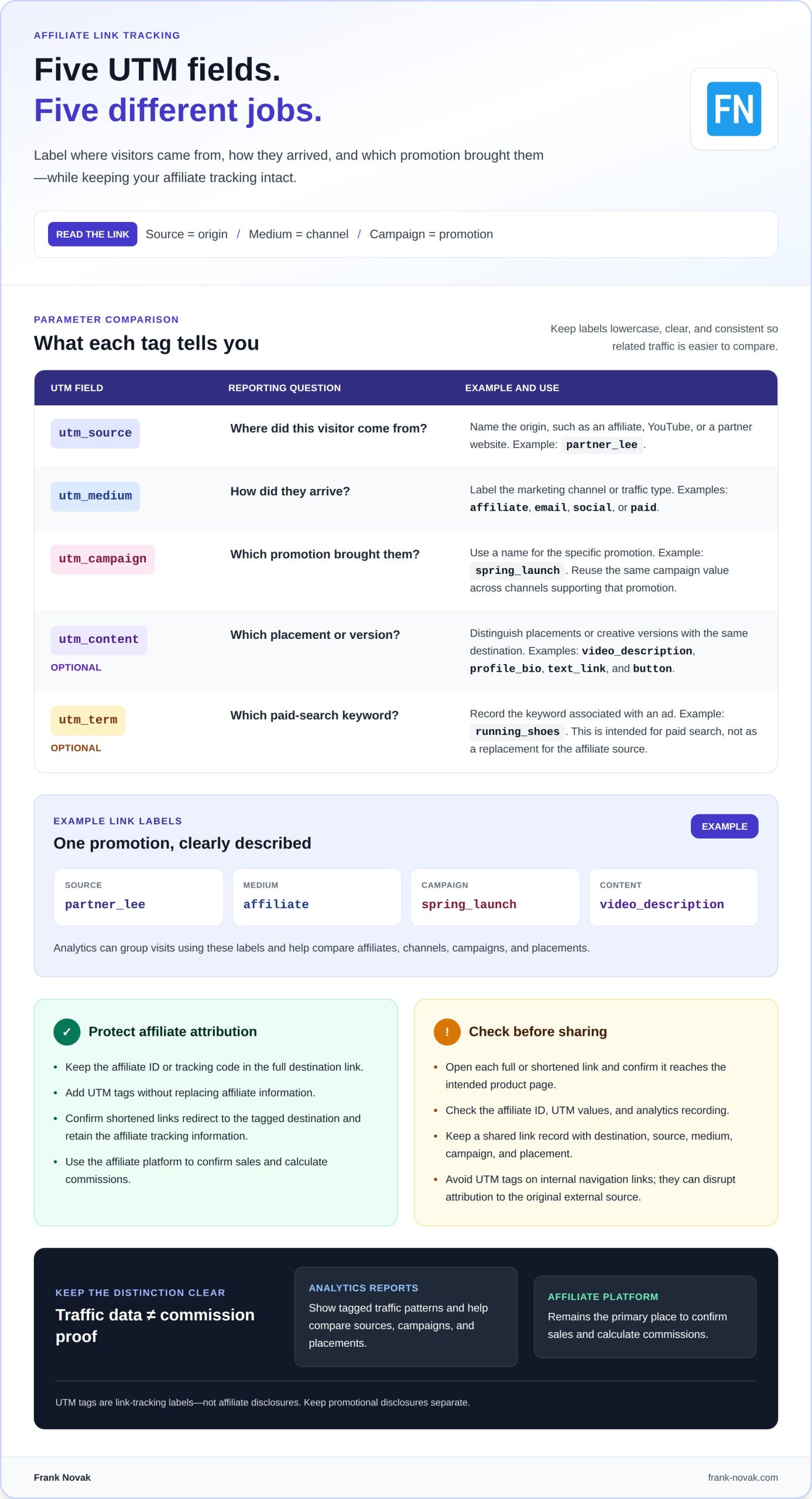
How UTM parameters identify affiliate traffic
UTM values tell analytics how a visitor reached a page and which promotion they followed. Their labels describe traffic; affiliate-program tracking remains the basis for assigning commission.
- Label the affiliate as the traffic source. Set
utm_sourceto a recognizable affiliate name or identifier, such aspartner_lee. Use one stable value for that affiliate across links. If the same person appears asleein one link andpartner_leein another, Google Analytics may report separate sources instead of grouping the affiliate’s traffic.Use
utm_mediumto describe the channel, such asaffiliate,email, orsocial. Then assignutm_campaignto the promotion. Together, these labels show that a visit came from partner Lee through an email promotion, rather than treating all visits as one undifferentiated source. - Read the landing-page report as a traffic signal. When someone clicks a tagged link, the UTM values can appear in analytics reports for that visit. For example, a report grouped by source can show visits labeled
partner_lee, while the medium and campaign show the associated channel and promotion.This helps you understand which traffic sources reach your site and which campaigns attract your audience. If an email link lacks UTMs, Google Analytics may classify its traffic as direct. Clear labels make those visits easier to distinguish from someone who typed your address or clicked an untagged link.
- Compare visits with affiliate-program records. Use analytics to examine visits and conversion activity by source, medium, and campaign. Then compare those patterns with the affiliate platform’s sales and commission reports. If a tagged partner link brings visits but the network reports no credited sale, the reports point to different parts of the customer journey.
UTMs describe marketing activity on your own properties; affiliate software uses its tracking link, cookies, referral IDs, or other methods to assign sale credit. A UTM label alone doesn’t confirm that a particular affiliate earned commission. Use the platform’s reporting as the commission reference, and analytics to assess traffic and campaign performance.
- Preserve the original source as visitors move through your site. Store the original UTM values as visitors navigate so later activity can remain connected to the first tagged source. Don’t add UTMs to internal links. Tagging a link from one page on your site to another can start a new session and attribute a later conversion to that internal label.
For example, if a visitor arrives from
partner_leeand clicks an internal product link, preserve the original source rather than replacing it. This gives you a clearer view of the path from partner traffic to a possible purchase, while the affiliate program continues to determine commission credit.
Frank Novak
Frank Novak is a natural next step if you want to apply affiliate tracking within a broader online business plan. Once your UTM labels are organized, the next challenge is connecting traffic insights with your wider marketing efforts and business automation. Online Success Coaching can support you as you develop your affiliate marketing approach. It’s relevant if you’re looking for guidance beyond tagging links, such as building a clearer strategy around traffic and commissions. UTM reports still work alongside your affiliate platform’s records, so keep using both to understand promotion activity and credited sales. If you’d like to discuss your next steps, contact Frank Novak.
Make Your Next Tracking Decision Count
As a next step, decide what you want your reports to help you change. You might use affiliate traffic data to choose which promotion to refine, where to place a link, or which audience to reach next. That decision gives your tracking setup a practical purpose beyond collecting labels.
If you’re still shaping your affiliate marketing approach, learning how to use UTM parameters for affiliate tracking can support a wider plan. Frank Novak offers Online Success Coaching, ClickBank Super Funnel, and Never Succeed Online to help develop an online business. Choose the resource that fits your next step, and build your measurement habits as you go.
Keep learning, make one thoughtful improvement at a time, and use clearer reporting to guide your next move.
Frequently Asked Questions
What are UTM codes?
UTM codes are labels attached to campaign links so analytics can identify the marketing activity behind a visit. For example, a link in a partner’s email can carry labels that distinguish it from the same partner’s social post. The codes don’t create a sale or prove commission eligibility. They help you interpret how people reached a page and compare different promotions.
What exactly are UTM parameters?
UTM parameters are named fields in a link’s query string, each followed by a value. A parameter name such as utm_source identifies the type of information, while a value such as partner_lee supplies the detail. Analytics tools can read these fields when a visitor lands on a tagged page. Since you choose the values, clear wording makes reports easier to interpret.
Are UTM parameters case-sensitive?
Yes. Analytics can treat values such as newsletter and Newsletter as separate entries. If one email link uses “Spring_Sale” and another uses “spring_sale,” campaign reporting may split their visits. Choose a capitalization style before launching links, then apply it consistently to new promotions. This is especially useful when several partners or channels share campaign names.
What Are the Benefits of Using UTM Code?
UTM codes help you compare where visits come from and which placements attract attention. For instance, you can distinguish a link in a video description from one in a profile bio, even when both lead to the same page. That context can inform future campaign decisions. UTM reports complement affiliate-platform records, but the platform is where to review credited sales and commissions.
What are UTM parameters and why should affiliates use them?
Affiliates use UTM parameters to add campaign context to links and understand which sources bring visitors to a destination. Separate labels, for example, can show whether traffic came from a partner newsletter or social post. This can help an affiliate decide which placements to develop. The affiliate tracking link still matters because UTM labels alone don’t identify who receives commission for a purchase.
What happens to the original UTM values if users visit multiple pages before making a purchase?
Original values can remain useful throughout a visitor’s journey if the site preserves them as the visitor moves between pages. Without that continuity, later activity may no longer show the first campaign that brought the visitor in. For example, a shopper could arrive from an affiliate email, browse product pages, and buy later. Avoid adding tracking tags to internal links, which can disrupt source attribution.
Why is UTM tracking useful in the first place?
UTM tracking turns otherwise hard-to-distinguish visits into reportable campaign activity. It can answer practical questions, such as whether an affiliate’s email or social post brings more engaged visitors. Consistent labels let you compare results over time and make more informed choices about where to focus promotional efforts. Pair analytics insights with affiliate reports to understand both the visitor journey and recorded commission credit.
Which UTM parameters should affiliate marketers use, and what values should they enter?
Start with utm_source for the affiliate or platform, utm_medium for the channel, and utm_campaign for the promotion. For example, an affiliate newsletter might use source partner_lee, medium affiliate, and campaign fall_launch. Add utm_content to distinguish placements, such as a button and a text link. Use utm_term for paid-search keywords when relevant.

Article by
Frank Novak
Frank Novak is an online marketing professional and coach who focuses on affiliate marketing and business automation. Through his website, frank-novak.com, he shares insights and strategies for leveraging social media platforms like Facebook to generate traffic and commissions.
Affiliate / Sponsored Content Disclaimer
This [website/post] contains affiliate links. If you click through and make a purchase, we may receive a commission at no additional cost to you. We only recommend products or services we believe will add value to our readers.